
The basics of customizing Dawn, Shopify's fast and extensible official theme

This article is an introductory book by our company on Shopify, Hello Shopify Themes: A Guide to Shopify Theme Development Here's an excerpt from .
In this chapter, we will use the Shopify CLI to actually customize Dawn themes.. We’ll cover not only Dawn features but also “dynamic section blocks”, “meta-fields” and “form extensions,” which are widely useful for other topics, so be sure to check out our near customizations.
It is okay to read only the necessary parts, but if you are not used to developing a theme, we recommend reading it in order while moving your hands.
The content of this article is also explained on YouTube.
Contents [ hidden display ]
Characteristics of Dawn Themes
Dawn is an OS 2.0-ready theme developed by Shopify, designed with a focus on light weight, high performance and flexible extensibility.
As of February 2022, Dawn is set as the default theme when you build a store.
In addition, the Dawn source code is published and available to anyone.
As Dawn says in its GitHub message, “Dawn works as a reference to build themes,” if you’re going to touch on an OS 2.0-ready theme, it’s best to know about Dawn first.
Whether you want to customize other third-party themes or develop your own theme for OS 2.0, Dawn's design is a great reference.
Shopify/dawn
https://github.com/Shopify/dawn
In this section, we will give you a quick introduction to the features of Dawn themes before we discuss individual customization examples.
prior confirmation
The following explanations will be made on the assumption that the following environments are in place.
If you want to read while actually checking and editing the code, please complete the environment construction by referring to previous articles.
- we've created a development store.
- Shopify CLI Installed
- Locally Created Development Themes (Replicating Dawn Themes)
Getting Started With Shopify Theme Development
Getting Started with Shopify Theme Development
Getting Started With Shopify Theme Development: Hello World with the Shopify CLI
and the following elements shall be pre-knowledge, omitted.
- Basic Knowledge of HTML/CSS/JavaScript
- basic knowledge of a web browser
- Basic Knowledge of JSON
- Basic Manipulation of Command Line Tools
- Basic Operations on the Shopify Admin Screen
Speed of Display: Lightening and Performance Improvement
The relationship between web page display speed and bounce rate is widely known, but slow viewing speed in particular can lead to lower conversions—reduced sales—in the online store.
With Dawn, you can see in many ways how to make the theme lighter and perform better.
Leveraging Browser Features to Reduce JavaScript Usage
One of the most distinctive is efforts to reduce JavaScript usage.
The more JavaScript you use, the lower your web page performance.
Dawn minimizes JavaScript usage and leverages browser features and CSS instead to make it lighter and more performant.. With the evolution of browsers, many of the functionality that used to be implemented in JavaScript is now standard in browsers.
Dawn uses progressive enhancement techniques to make the core content and functionality of your store accessible even in older browsers, while also providing a more convenient store experience for users who have access to modern browser features.
Instead of plug-ins like lazysizes.js, Dawn implements lazy loading using the loading attribute that became a standard browser specification in 2020. Since jQuery is also not used, please note those who are developing with jQuery on a daily basis: You can add it yourself, but Dawn's original performance will no longer be demonstrated.
Improved Maintainability: Modularizing Code
Debut, Dawn’s Previous Default Theme: Most of the theme CSS and JavaScript assets/theme.css and assets/theme.js to be described as the basis for each page layout/theme.liquid It was loaded.
As a result, the amount of descriptions per file has become huge and maintenance is somewhat difficult.. With Dawn, CSS and JavaScript have been split into separate files for each page/feature, and we’ve changed our design to read only as much as needed on every page or section.
the whole store's common description assets/base.css and assets/global.js as layout/theme.liquid a sectional file that reads in, e.g. for product pages) sections/main-product.liquid It is a form to be added at the beginning of.
/sections/main-product.liquid
{{ 'section-main-product.css' | asset_url | stylesheet_tag }}
{{ 'component-accordion.css' | asset_url | stylesheet_tag }}
{{ 'component-price.css' | asset_url | stylesheet_tag }}
{{ 'component-slider.css' | asset_url | stylesheet_tag }}
{{ 'component-rating.css' | asset_url | stylesheet_tag }}
{{ 'component-loading-overlay.css' | asset_url | stylesheet_tag }}
{{ 'component-deferred-media.css' | asset_url | stylesheet_tag }}
{%- if product.quantity_price_breaks_configured? -%}
  {{ 'component-volume-pricing.css' | asset_url | stylesheet_tag }}
{%- endif -%}
With only the CSS and JavaScript required to load, code for each file is now easier to read and maintain.
High extensibility: many components that can be manipulated by the theme editor
Moreover, while this is not limited to Dawn, OS 2.0 brings dynamic additions to sections that allow you to add a variety of components (the parts that make up the appearance of your store) without code from the theme editor.
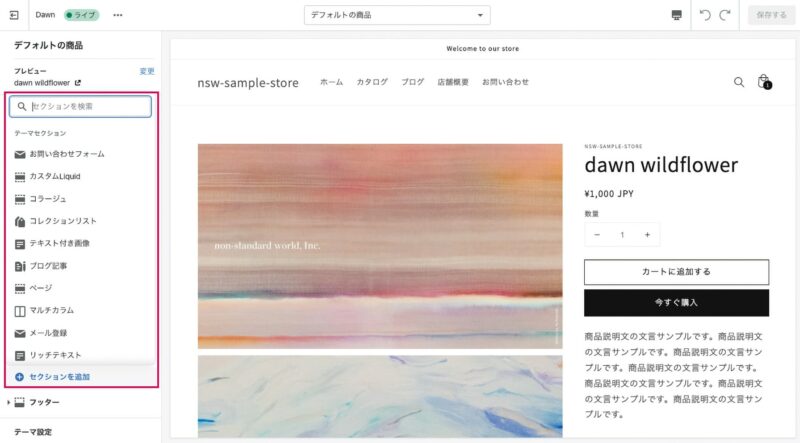 An Example of Theme Section
There is a list of theme sections that can be added to the left sidebar, and Dawn has dozens of dynamic sections available.
Previously, only the top page was able to dynamically add/remove sections from the theme editor and even a few campaign banners were required to write Liquid on product pages.However, OS 2.0-enabled themes including Dawn now allow for dynamic addition of sections to all pages created in JSON templates.
The capture below shows how the theme editor adds a “Featured Collections” section to your product page:Dawn remains default, Liquid doesn’t edit any lines; you can freely add sections without having to go to the top page and change settings or text in the section from the right sidebar.
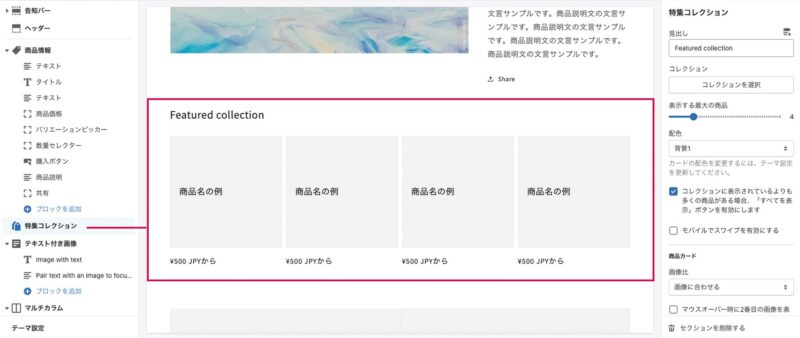
Example display of an added section
Each Dawn component is based on atomic design, and it’s designed to make sure that the overall store color balance or layout doesn’t break even if merchants make a variety of changes in their theme editor.. As updates are frequently made, custom examples from this book may eventually be handled by the theme editor as standard features.
However, since it is unlikely that Dawn will implement features such as covering Japanese-specific business practices (delivery date and time specifications), we would like to support them in apps or Liquid development.
accessibility consideration
Shopify is always focused on dealing with web accessibility.
Dawn is also an ingenious theme that allows you to use content without any hindrance, even if you access it through assistive technologies such as screen readers and keyboard controls.
In terms of media manipulations such as carousel sliders and color contrast ratio, accessibility-friendly design has been done to carefully remove elements that cause visual confusion.. We won’t go into more detail about accessibility in this book, but we have published the best practices for theme design based on WCAG (Web Content Accessibility Guidelines) on our documentation so if you are interested, please read it.
Accessibility best practices for Shopify themes
https://shopify.dev/themes/best-practices/accessibility
Dawn Development Secret
The Shopify UX team’s official blog describes the development and design intent of Dawn in detail.
Among other things, it is interesting to think about how to balance display processing speed with the functions required for EC and this article will help you understand Dawn.
Next-generation theme design: how we made Dawn fast, extensible, and beautiful
https://ux.shopify.com/next-generation-theme-design-5aae94f6d44c
Overview of Dawn Customization
This is the feature description of Dawn.
Finally, I will give you a brief overview of Dawn customization in this chapter.
It is okay to read only the necessary parts, but if you are not used to developing a theme, we recommend reading it in order while moving your hands.
Dynamic sections and blocks
As mentioned above, Dawn provides a wealth of section components but there are still some that can't be expressed. In this book we gave an example "FAQ", which describes dynamic sections and blocks and implements simple FAQ section components that you can manipulate from the theme editor.
Commodity Metafields and Dynamic Resources
Use the Commodity Metafield feature, which has been provided as standard since OS 2.0, to display your own additional information on the product page; here we implement “Product Subtitle” and “Product Release Date”.
Product and Cart Form Extension
Add “Line Item Property” and “Cart attributes” to Liquid so that additional information from users can be sent to the Shopify side via a form.
We also introduce how to place a test order in the development store.
Introduction of Japanese Font
As of February 2022, Dawn’s typography is not optimized for Japanese fonts; we will introduce you to the adjustment around your font so that it has a more visible store look.
It also explains how to edit the theme setting and CSS variables used in Dawn’s CSS.
Supplementary: Theme styling and Sass
In order to focus on Liquid, we have omitted CSS styling (*except for the introduction part of Japanese fonts).
If you want to add styling, Dawn's existing CSS files will not be edited very much from a maintainability perspective. assets Add to a directory and let it read into the required Liquid file.
and in that case, the theme styling .scss or .scss.liquid Keep in mind that the extension SCSS file is not available, and since November 2020 Shopify has deprecated styling with Sass.
If you want to write Sass in a Dawn theme, create a directory such as scss directly under the Theme folder and compile it with the following rules:
scss/sample.scss→assets/sample.css
The folders and files that you add yourself to directly below the theme folder are not recognized as part of the theme, but in the Shopify CLI. shopify theme push It is excluded from the upload target of command.
You can only add them directly to the theme folder. assets/scss/sample.scss If you include your own subdirectories such as . shopify theme push Returns an error.
Click here to purchase the introductory book on Shopify theme development that we produced at our company.
We do not have any plans for printing after the sale at this time, so if you would like to read a printed book please pick us up as soon as possible.

- Author: Sayaka Kawashima
- Publishing: Non-standard world, Inc.
- Number of pages: B5, 248
- Price: 3,850 yen (tax included) * Packed with PDF version, free shipping