An overview of Shopify themes and an introduction to the Liquid template language

This article is an introductory book by our company on Shopify, Hello Shopify Themes: A Guide to Shopify Theme Development Here's an excerpt from .
Hi. I'm the engineer Kawashima.
An introductory book on Shopify Theme Development, which I wrote. Hello Shopify Themes: A Guide to Shopify Theme Development It's been two weeks since the sale of "Thank you very much for reading your comments.
Contents [ hidden display ]
1-1. Overview of Shopify Themes
A Shopify theme is a design template that determines the appearance of an online store.
Each theme has a common directory structure and open source template language Liquid It is composed of files such as HTML, CSS, JavaScript and JSON.
Depending on the theme, the purchase experience for users who visit our online store will vary greatly.
Since the EC site is not only good for buying products, it also plays a role in conveying brand characteristics and atmosphere to users, so I want to choose a theme that is more suitable for brands, and if you want to add additional originality to the theme, it will be a turn to the theme development.
As of February 2022, when you open the Shopify store, "Dawn", which is an official theme corresponding to OS 2.0, is set as a default theme.
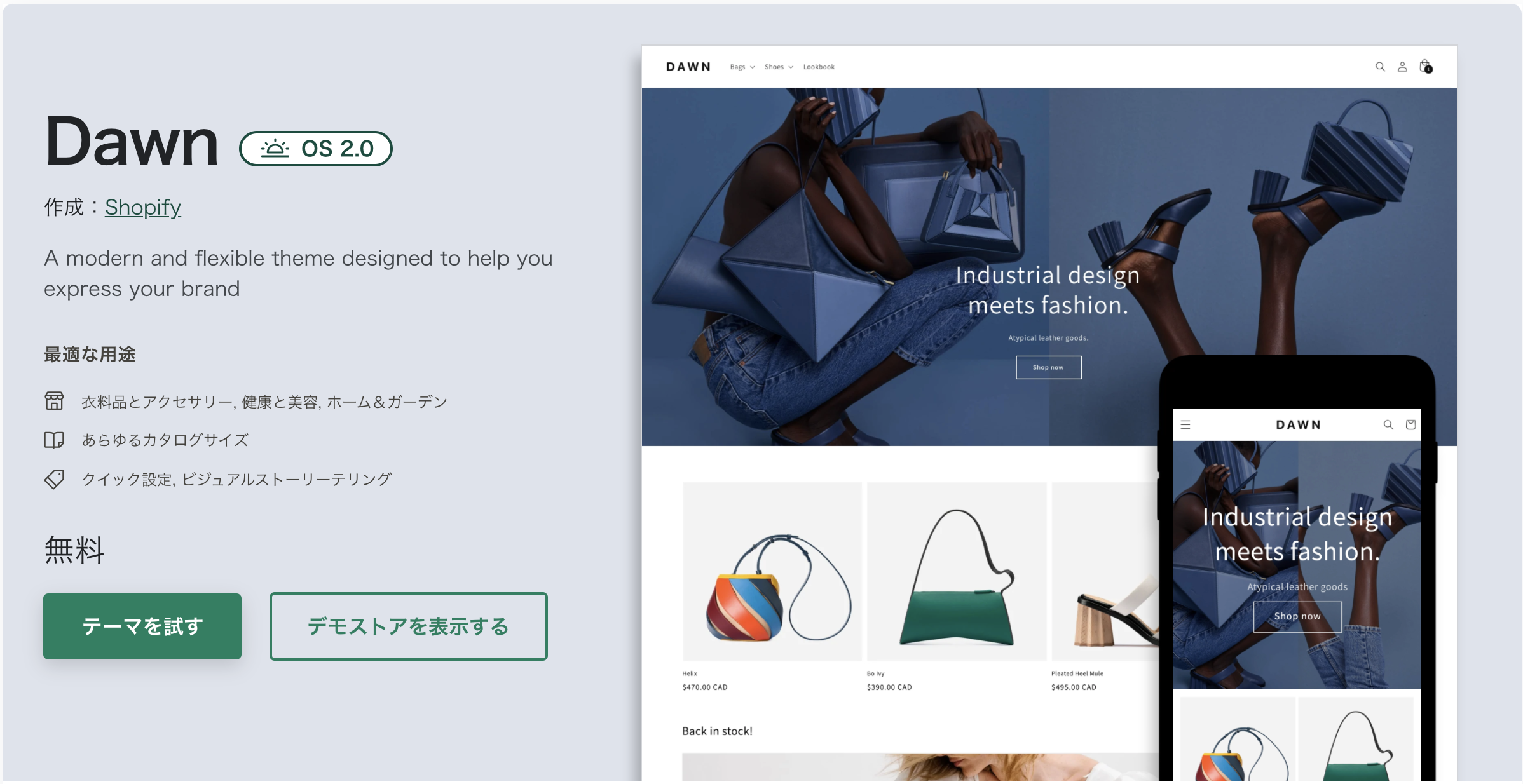
Dawn Theme Capture Image
Simple and Basic Dawn Theme Looks Like Shopify, With Better Display Speed And Accessibility
In addition to Dawn, a variety of free and paid themes are available from the Shopify theme store.
Shopify Theme Store
https://themes.shopify.com/
If the theme is developed according to Shopify’s criteria, you can also sell it in our store and earn money.
subject-controlled range
At Shopify, we offer a number of features that are required on the EC such as ordering goods and payments. something related to the appearance or composition of an online store) Yes.
Since the core functions of EC are clearly separated from the styling of store appearance, various functions such as payment will be out of range of the theme.
Because of the split between these two, Shopify themes have little to do with security considerations and are easy to develop.However, if you don’t know about the control range of the theme, it is often found that “it was a feature that can not be implemented by the theme” later, which causes you to get back in hand.
For example, the following customizations are not possible with a single theme.
- Added input field to product management screen
- NEW FUNCTIONS, such as Restocking Notifications and Wishlist Registration
- Change the URL structure of blog posts and fixed pages
On the other hand, these customizations can be achieved.
- Added an input field to the theme editor screen (see below).
- Add a date and time specified form to the cart screen
- reflecting individual designs for each blog post or fixed page
There are a lot of customizations that can be achieved if you combine “metafield (details in chapter 3)” and “app (described later in this section), so to determine the point, let’s understand how Shopify theme works.
Application and Theme Development
At Shopify, we have released a number of apps to extend our store capabilities.. As mentioned above, combining them will greatly expand the capabilities that can be achieved in theme development.
However, many apps are paid (*on a monthly basis in general), and if you increase them too much, app-derived JavaScript may affect the speed and maintainability of your store.
There are also features that can be realized by the theme alone without using an app, so I want to use it well-balanced.
Relations to the Theme Editor
The Shopify theme is characterized by “no-code, flexible customization even for merchants (store owners and staff) who are not familiar with programming.
This customization screen is called the “Theme Editor”, a store appearance editing tool that can be accessed from Shopify’s Admin page.
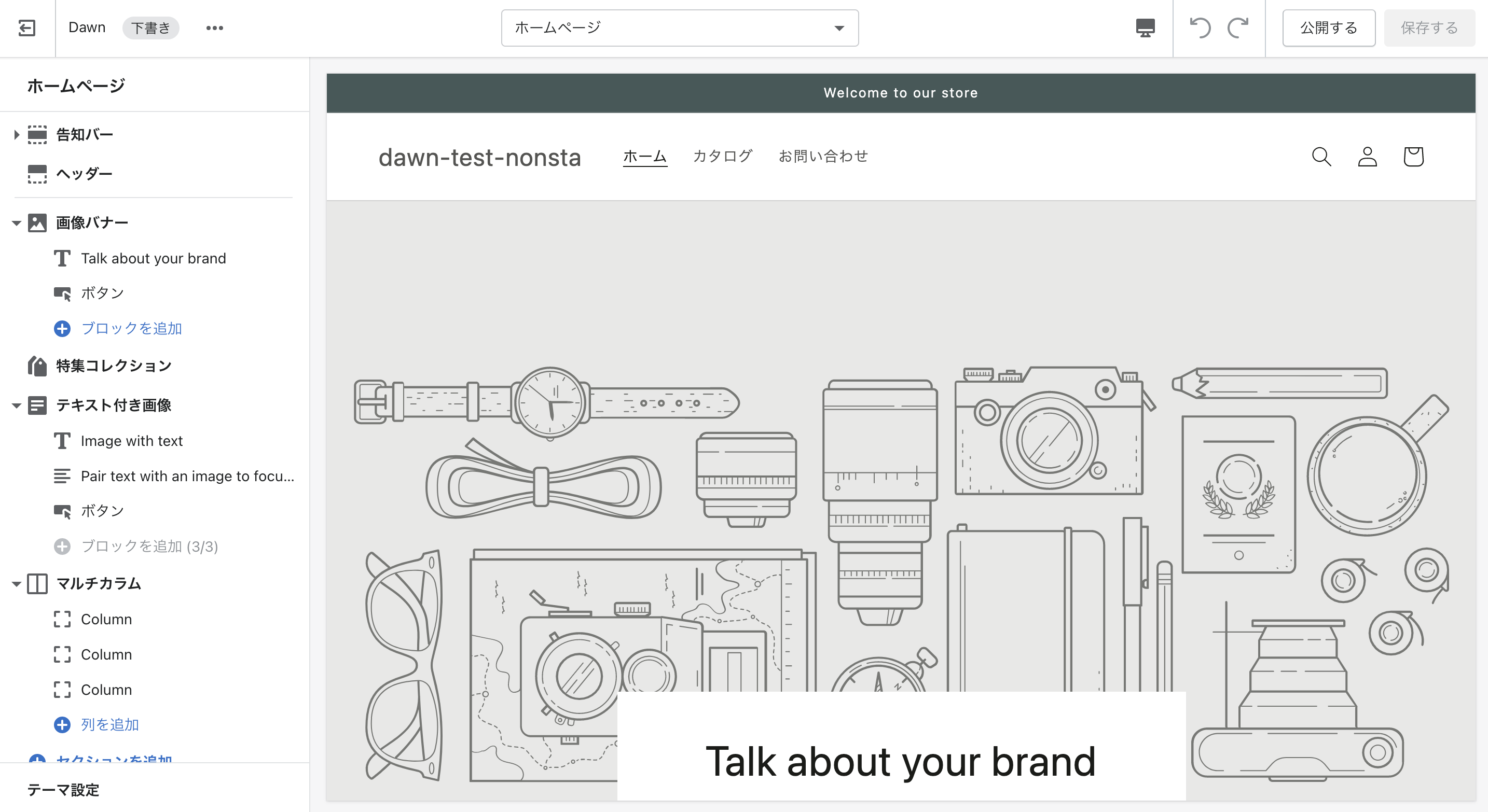
capture image of the theme editor
The appearance of the theme editor. There are various settings in the sidebar, from which you can register images and texts
Merchant can manipulate the sidebar of its theme editor to update store appearance without touching any theme code. Is it easy to see when you imagine a main visual image on the top page or replacing campaign banners? No developer work is required, and stores can be updated as soon as they are needed.
Controlling settings in this theme editor is also the role of the theme: all settings, such as “the updated part from Theme Editor” and “types of content that can be registered”, are described within the theme.
If the appropriate settings are not written on a theme, then the sidebar is white and no code can be updated even if you open it.. When customizing themes, you need to take into account not only the store appearance but also the theme editor.
The content registered from the theme editor (text and image path) is also saved in the theme.
Three Settings to Handle in Theme Editor
The setting items handled by the theme editor can be classified into three categories:
- theme setting
- section setting
- block setting
Details will be explained in detail, but each setting has a different impact range.
Theme settings are controlled by the whole theme (theme color, fonts, SNS account information, etc.), while section settings include a part of the theme (product information or main visual) and block settings controls repeating modules called blocks in section settings.
Template Language "Liquid"
Next, let's look inside the theme and into source code.
If you’ve never touched a theme before, check out some Dawn-themed files from the following URL:
Dawn Theme GitHub Repository
https://github.com/Shopify/dawn
extension .liquid The files are prominent.
Liquid is a Ruby-based templating language developed by Shopify. Liquid is the cornerstone of the theme and is essential for getting and displaying dynamic content such as products or blog posts from the Shopify store.
Do you feel that the learning hurdles are high?
Sure, you’ll need to learn how Shopify works in order to master Liquid, but a small piece of code can be easily added if you know the basics of HTML.
Dawn-themed theme/layout.liquid Let's take a look at the source code beginning.
<!doctype html>
<html class="no-js" lang="{{ request.locale.iso_code }}">
  <head>
    <meta charset="utf-8">
    <meta http-equiv="X-UA-Compatible" content="IE=edge">
    <meta name="viewport" content="width=device-width,initial-scale=1">
    <meta name="theme-color" content="">
    <link rel="canonical" href="{{ canonical_url }}">
    <link rel="preconnect" href="https://cdn.shopify.com" crossorigin>

    {%- unless settings.type_header_font.system? -%}
      <link rel="preconnect" href="https://fonts.shopifycdn.com" crossorigin>
    {%- endunless -%}

    <title>{{ shop.name }}</title>

    {% if page_description %}
      <meta name="description" content="{{ page_description | escape }}">
    {% endif %}

    {% render 'meta-tags' %}
    ...
You can see that it is based on the familiar HTML.
If you don’t need to integrate with the store content or theme editor, just write an HTML tag in a proper Liquid file.
If you are new to the theme, it is good to get used to working with Liquid files starting from adding or changing HTML tags.
Eventually, when you start working with store content at development time, the Liquid syntax comes into play.
An Unfamiliar Double Screw in the Code Sample {{ }} midcoat with a percentage of {% %} is written in Liquid syntax.
Details are discussed in chapter 4, but if you understand the following two categories, it will be easier to understand the characteristics of theme files.
Liquid object
This is an object to access Shopify’s content data, and when outputting the data it can be double-sized. {{ }} It is described in.
The following Liquid syntax displays the title of a product:
{{ product.title }} There are many different types of Liquid objects that I've described here product An object holds the content data of a product. product.title and by connecting it to a dot syntax product objective title The value of the attribute can be displayed.
In addition, some Liquid objects will change their behavior depending on the Liquid file they are writing to.
for example, described in a file that is loaded on the product page {{ product.title }} It only outputs the right title for each product, but I wrote it in a file on my blog post page. {{ product.title }} I will not return any information.
liquid tag
A tag that describes programming logic in Liquid. {% %} It is described in.
If you’re familiar with JavaScript, you probably know the if and for statements: You can use Liquid tags to perform conditional bifurcation or iterative operations in a Liquid file.
The following code is a sample if statement using Liquid tag:
{% if product.title == 'Shopifyテーマ開発ガイド' %}
  <p>Enjoy Shopify Development!</p>
{% endif %}
i mentioned it earlier. product.title If the output product title matches "Shopify Theme Development Guide", you will see a “Enjoy Shopify Development!” sentence.
There are many different kinds of Liquid tags, including getting Shopify-specific elements, defining variables and rendering more liquid files in a Liquid file.
Live Themes and Theme Library
Finally, there is only one theme that can be reflected (actually displayed) in the store; it will be described as “current theme” on the management screen, but this book will refer to “live theme”.
Themes other than live themes are saved in draft state to the theme library, and can be customized or previewed with no problems.
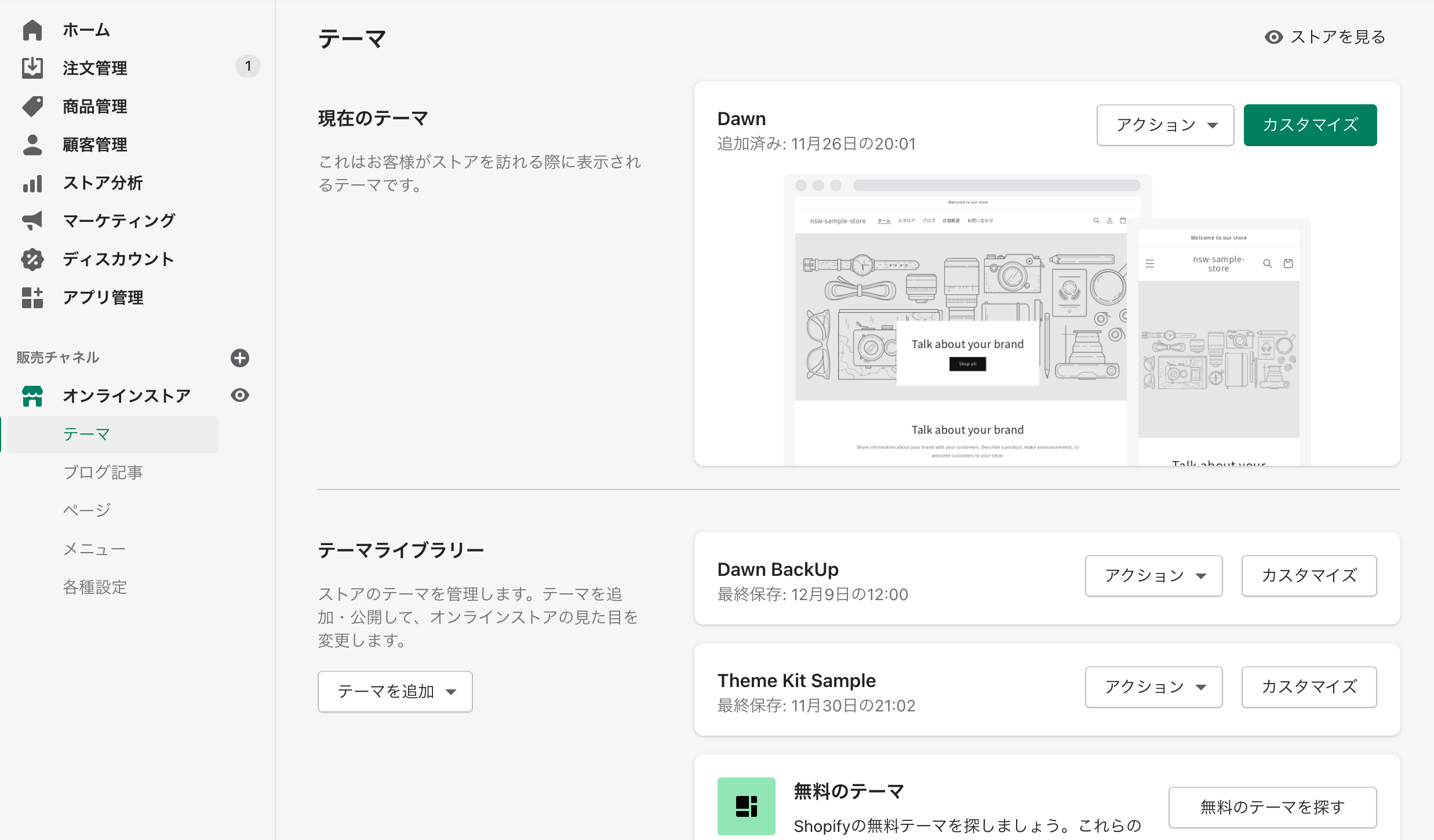
Capture Image of Theme Management Screen
Here "Dawn" is a live theme, and other themes (such as Dawn BackUp) are stored in the theme library as draft themes.
Don’t miss out on common web production examples, as much as you can by smashing a public production environment (a live theme from an already published store) and editing it in production: if there are mistakes in code editing, the layout collapse or error will be exposed to your store.
It is the basic development flow that develops and tests in a different environment, if there are no problems, it will be reflected in production live theme.
5/9 Addendum: The second free release, we've published a part called 1-2. the structure of themes !
The purchase of this book is accepted from the special feature page here.
We do not have any plans for printing after the sale at this time, so if you would like to read a printed book please pick us up as soon as possible.
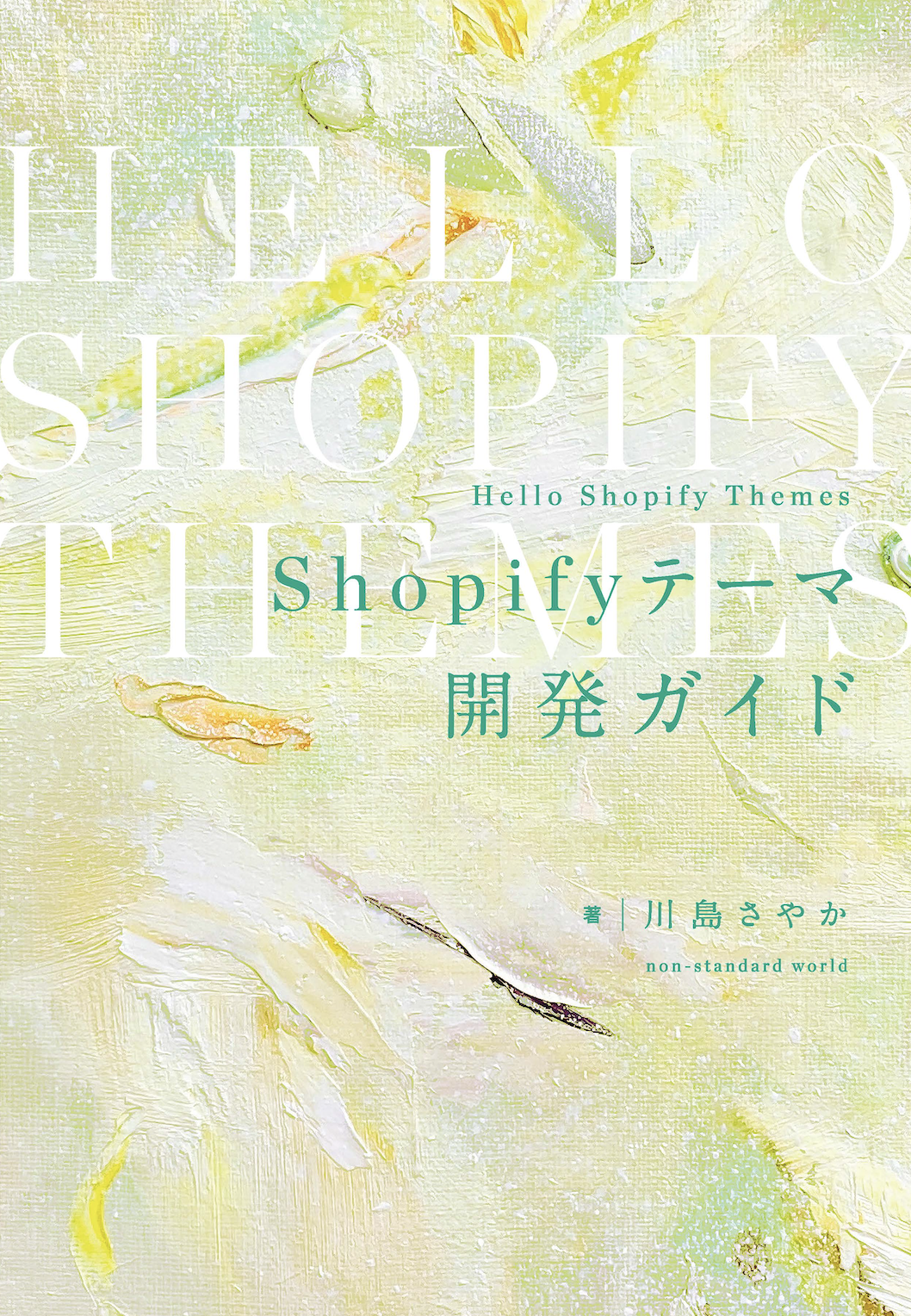
- Author: Sayaka Kawashima
- Publishing: Non-standard world, Inc.
- Number of pages: B5, 248
- Price: 3,850 yen (tax included) * Packed with PDF version, free shipping