Explanatory videos for every part of Chapter 3 of “Hello Shopify Themes” are now available

Hi. I'm the engineer Kawashima.
We recently published the first chapter of Hello Shopify Themes for free in a blog post, but there was another project that was going on at the same time behind it.
here's the guide you see on page 6 of this book:)
Some of the customization examples introduced in this book can be checked from an explanation video scheduled for later upload to the actual completion screen.
Thank you for waiting a month or more since the publication!
Chapter 3 “Dawn Theme Customization” has been released.
If you already have this book, please use it as a reference material and help to deepen your understanding of Dawn.
* Video audio is discreet because of the recording environment, please raise the volume of your PC when watching.
Here’s a list of videos that explain “Dawn Theme Customization” You can also access it.
This article provides a brief overview of each video description part.
The contents of Chapter 3 are assumed to have the following environment:
- The Shopify Development Store Is Open
- Shopify CLI Installed
- Locally Created Development Themes (Replicating Dawn Themes)
And, the following elements are pre-knowledge and omitting details.
- Basic Knowledge of HTML/CSS/JavaScript
- basic knowledge of a web browser
- Basic Knowledge of JSON
- Basic Manipulation of Command Line Tools
- Basic Operations on the Shopify Admin Screen
Contents [ hidden display ]
3-1. Overview of Dawn Themes
This part, which will be the beginning of chapter 3, explains the features of Dawn theme as a whole.
We have summarized what kind of design intentions Dawn is, what features it has and what we would like to know before touching the customization examples for each part.
Chapter
00:00 greetings
00:52 Summary of the Dawn theme
03:47 Speed of display: Efforts to Lighten and Improve Performance
06:30 Improved maintainability: modularizing code
08:57 High extensibility: many components that can be manipulated by the theme editor
11:58 Accessibility considerations
========================
and subtitles below the axe.
Accessibility for Dawn (around 12:50)
* I was disappointed, but there is a strong need to respond as laws concerning accessibility are being developed overseas.
========================
3-2 Creating dynamic sections and blocks
In the 3-2 part, we’ll show you how to create your own FAQ component using a new feature in OS 2.0: Sections Everywhere and section blocking.
Since styling such as CSS is not applied, please use it as a basis for customization.
Not only FAQ components, but also ideas for creating your own sections and blocks are explained in this section.
Chapter
00:00 greetings
01:37 Sections Everywhere
05:30 Creating your own FAQ section
07:18 Lets you use it as a dynamic section
09:30 Lets you change your FAQ title from the theme editor
12:45 Drop FAQ items into blocks
3-3. Utilization of metafields on product pages
In 3-3 parts, you can leverage Shopify’s meta-field capabilities to add subtitle and release date information to your product.
In addition to treating the generated metafield values as dynamic resources in the theme editor, we also introduce splitting processing combined with Liquid condition branching.
If you are unfamiliar with the section block, please also see the above 3-2 parts.
Chapter
00:00 greetings
00:52 On Metafields in Shopify
02:25 Use as a dynamic resource from the theme editor
11:30 Application : Metafield and conditional bifurcation
========================
and subtitles below the axe.
Shopify Metafield display (around 1:42)
* A predefined meta-field on the Shopify side, called a standard definition meta-field, can be displayed on the theme simply by entering values.
Display of custom defined metafields (around 04:02)
* Even if it is a custom defined meta-field, you do not need to edit Liquid only by displaying it (it can be displayed from the theme editor).. As explained in this video, when you want to combine with conditional branching etc.
========================
3-4. Expansion of form for goods and carts
In 3-4 parts, we use Shopify’s Line Item Property and Cart attributes capabilities to extend the data that can be passed to your Shopify management screen.
For example, you can collect engraved word information on products and whether or not there is a hope for gift wrapping only with Liquid's customization.
Chapter
00:00 greetings
00:57 Add an entry field to the item page in Line Item Property
12:07 Add an entry field to the cart page with Cart attribute
========================
and subtitles below the axe.
The form attribute of the Cart attribute input element (16:00)
*Don't forget to describe the form="cart" attribute in this Cart attribute input element.
3-5. Introduction of Japanese font
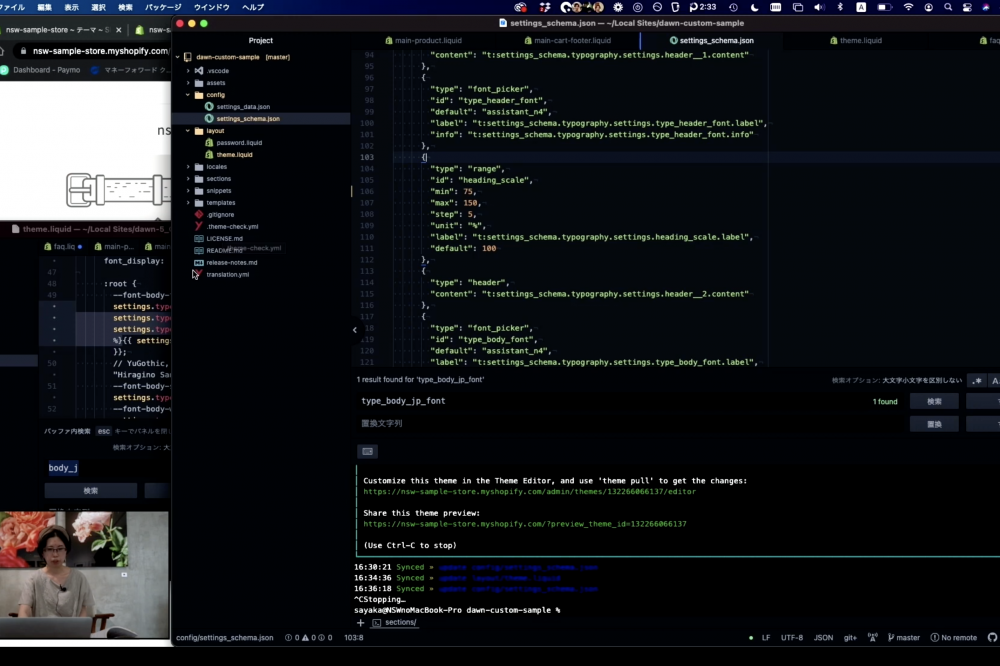
In the 3-5 part, we introduce customization examples of introducing Japanese fonts to Dawn themes.
Dawn's typography is not optimized for Japanese fonts, so you can look at various approaches such as overwriting with CSS alone.In this section we will add the input field of a Japanese font font-family to our theme editor by editing Sets_schema.
Chapter
00:00 greetings
01:01 Check font settings
add input settings for Japanese fonts to 02:59 settings_schema.json
Rewrite the CSS variable part of 06:20 theme.liquid
10:16 Allows font size to be reduced
Video commentary should be able to share what is displayed in the actual browser:)
I would be happy if you could use it as an auxiliary material of the book!
Purchase of this book is accepted from the special feature page :)
We do not have any plans for printing after the sale at this time, so if you would like to read a printed book please pick us up as soon as possible.

- Author: Sayaka Kawashima
- Publishing: Non-standard world, Inc.
- Number of pages: B5, 248
- Price: 3,850 yen (tax included) * Packed with PDF version, free shipping