
The structure of an original Shopify theme and implementation considerations for each page

This article is an introductory book by our company on Shopify, Hello Shopify Themes: A Guide to Shopify Theme Development Here's an excerpt from .
In this section, we will introduce the points that make it easier to implement each page file if you keep in mind.
Contents [ hidden display ]
Theme as a whole: styling (CSS/Sass)
CSS is an extension .css or .css.liquid is available for Liquid filter or Liquid in CSS. settings If you want to write an object, .css.liquid Please use the extension file.
「 3-1. Characteristics of Dawn Themes Shopify has been deprecating Sass styling since November 2020, as we’ve covered in the previous article. .scss or .scss.liquid It is necessary to be careful because there are cases where styling using “Styling” is introduced.
When using Sass for a theme, you can create directories such as scss directly under the Theme folder and compile them with the following rules to use both Shopify CLI/Theme Kit without problems.
`scss/sample.scss` → `assets/sample.css`Theme as a whole: JavaScript
JavaScript is an extension .js or .js.liquid Liquid filter or Liquid is available in JavaScript. settings If you want to write an object, .js.liquid Please use the extension file.
Dawn's JavaScript is often associated with HTML custom elements, and if you want to create an original theme on the basis of Dawn, it's a good idea to take over and implement them as much as possible.
The following is a description of Dawn’s product variation selection.
assets/global.js
class VariantSelects extends HTMLElement {
  constructor() {
    super();
    this.addEventListener('change', this.onVariantChange);
  }
  onVariantChange() {
  //略
}
customElements.define('variant-selects', VariantSelects);
snippets/product-variant-picker.liquid There is a custom element as specified if you look at it. data Let's use it as much as possible, including attributes and class names prepared for JavaScript invalidation.
<variant-selects
  id="variant-selects-{{ section.id }}"
  class="no-js-hidden"
  data-section="{{ section.id }}"
  data-url="{{ product.url }}"
  {% if update_url == false %}
    data-update-url="false"
  {% endif %}
  {{ block.shopify_attributes }}
>
  //略
</variant-selects>
In addition, Dawn is designed to work with the core features of the theme even if JavaScript has been disabled and there are no problems in buying products.
Theme as a whole: Menu features
Shopify provides a menu feature that can be used to implement navigation items such as headers and footers.
The hierarchical structure up to the third level can be set.
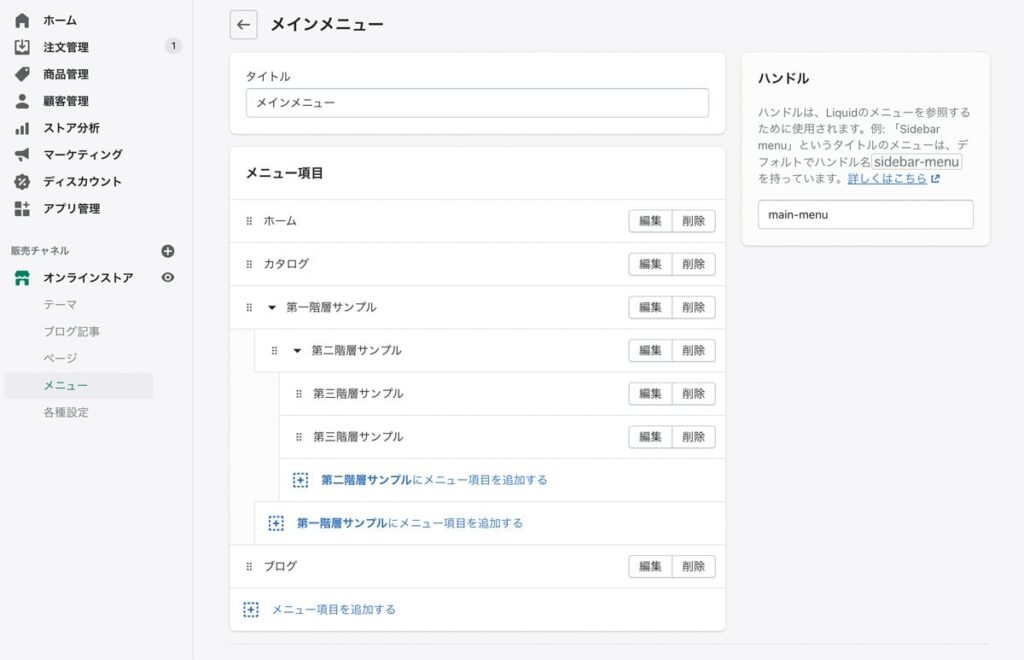
Shopify Menu
When accessing menu items from Liquid, use the linklist and linked objects. main-menu The menu with linklists.main-menu or linklists[main-menu] It is OK if you describe it.
The linklist object
https://shopify.dev/api/liquid/objects/linklist
The link object
https://shopify.dev/api/liquid/objects/link
When implementing it, be careful that the underlying links are also displayed properly.
<ul>
  {% for link in linklists.main-menu.links %}
    <li>
      // 下層リンクが存在する場合
      {% if link.links != blank %}
        <a href="{{ link.url }}">{{ link.title }}</a>
        {% for childlink in link.links %}
          //第2階層以下のリンクをループ出力
        {% endfor %}
      // 下層リンクを持たない場合
      {% else %}
        <a href="{{ link.url }}">{{ link.title }}</a>
      {% endif %}
    </li>
  {% endfor %}
</ul>
You can also set up more different menus in the menu. linklists.main-menu as a lower-level item on the menu linklists.sub-menu There is also a theme with the ability to set menus.
As of November 2023, Dawn version 11.0.0 isn't available but it should be considered depending on the merchant's request: you can implement both in your app and on Liquid alone.
top page
templates/index.json It's the face of an online store.
When using a carousel slider or video background as the main visual, I want to combine things like lazy loading because it affects display speed by all means and Vimeo can be implemented more simply than Youtube.
The Debut theme, for example, is not supported in OS 2.0. templates/index.liquid in {{ content_for_index }} It contains a description that ".
This is a Liquid object that used to be used when only the top page dynamic section was available, and this is where the top page sections added from the theme editor are rendered.
When developing an original theme, the top page is implemented as a Liquid template instead of JSON. {{ content_for_index }} Please write it in the template.
Collection (Items list) page
templates/collection.json The collection page is also the gateway to get interested in products, so let’s design the information you want to display properly.
The filter for narrowing down collection pages and search pages is built into Dawn as standard, but you can customize it further by introducing the Shopify Search & Discovery app.
Shopify Search & Discovery
https://help.shopify.com/ja/manual/online-store/search-and-discovery
Also note the number of items displayed per page: Shopify can display up to 50 products per page, but it is recommended that you set a suitable number in your store considering how fast pages are displayed.
The pagination implementation paginate Use the object.
The paginate object
https://shopify.dev/api/liquid/objects/paginate
collection list page
templates/list-collection.json This page shows a list of collections that exist in the store.
The other pages have roughly the same URL and template name, but the collection list page https://sample.myshopify.com/collections/ The URL of the collection page is displayed when accessing https://sample.myshopify.com/collections/[コレクションのハンドル値] Since it is set as the parent page of each collection, it is positioned.
In many cases, it operates as a page like “category list”.
product page
templates/product.json Since there are many components on the product page, let’s also refer to Dawn and make sure that all necessary parts are not missing:Dawn “Product Information” section incorporates the following elements as standard.
- commodity title
- commodity distributor
- commodity price
- variation picker
- quantity selector
- Item Purchase Button (including options for dynamic checkout buttons)
- product description
- social media sharing
at the core of a product page product It is an object.
product.options_with_values be a child element of an array product_option and objects, product.variants be a child element of an array variant Objects are also closely related.
The product object
https://shopify.dev/api/liquid/objects/product
The product_option object
https://shopify.dev/api/liquid/objects/product_option
The variant object
https://shopify.dev/api/liquid/objects/variant
Please note that product options and product variations are different concepts.
You can specify up to three options for a product, such as colors, sizes and materials.
Variations are a purchase option consisting of an optional combination: up to 100 types per item can be created.
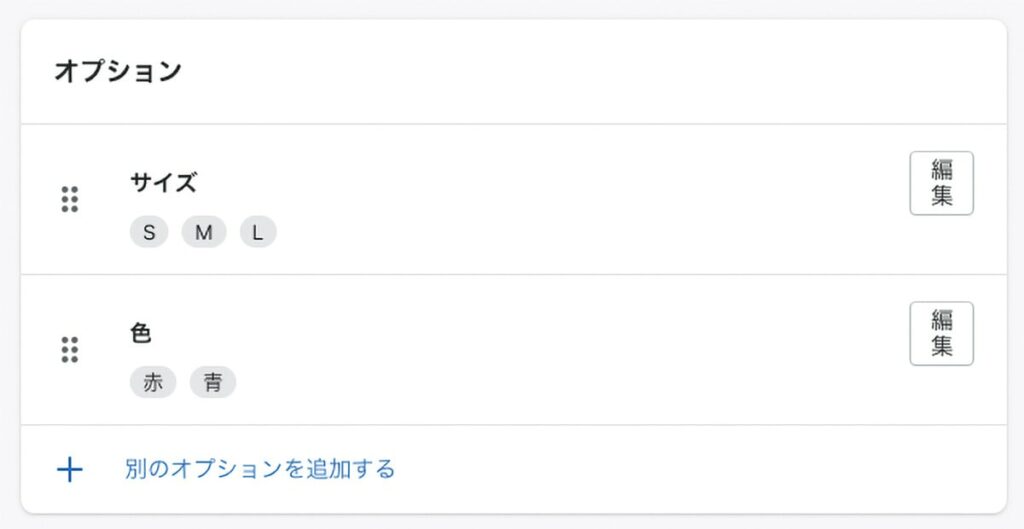
commodity option
Examples of product options, here we have created two options: “size” and “color”.
The "Size" option has the value of S.M.L, and the "Color" option has the value of "Red/Blue."
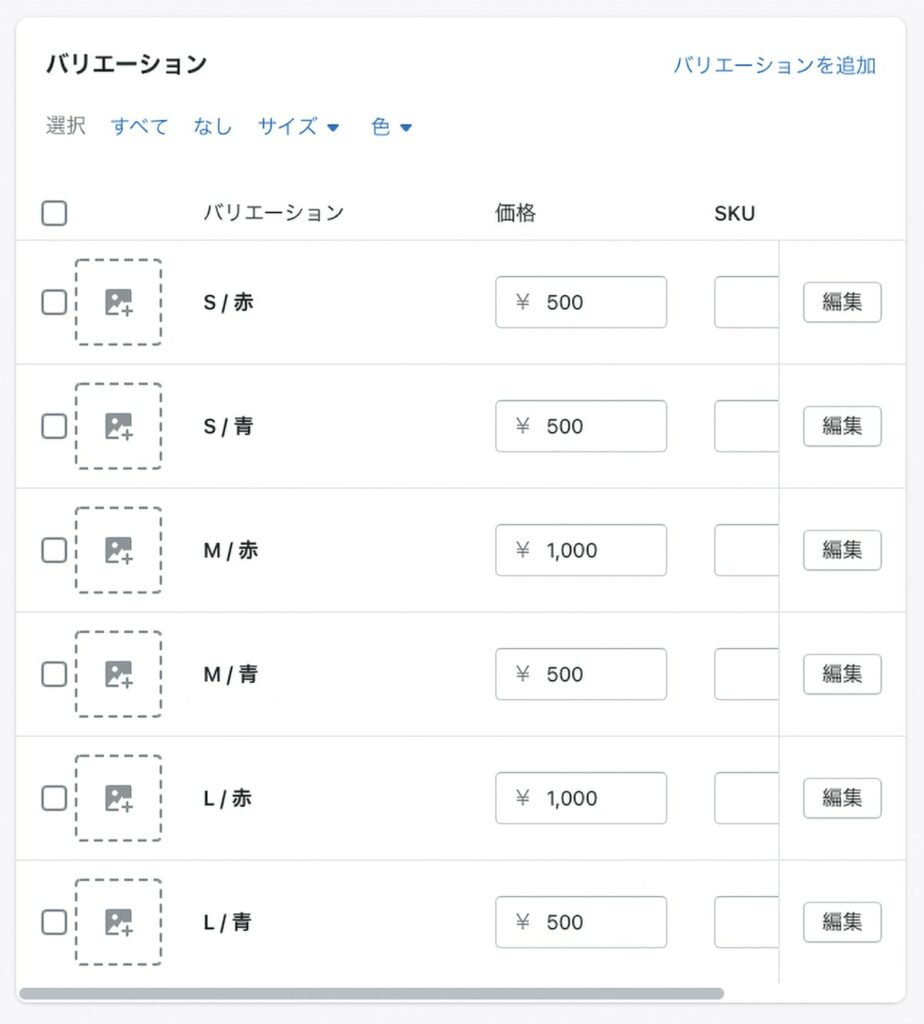
commodity variation
Examples of product variations. In this example, there are six variations in total: the values for "size" and "color" options are combined to form individual variations
In addition, the product page is a page that uses relatively many JavaScript.
In Dawn, you can choose to change the price assets/global.js the cart addition related processing of goods assets/product-form.js As of November 2023).
Please refer to the "Form Extension of Products and Carts" section for further information on the product page.
https://www.non-standardworld.co.jp/26557/
cart page
templates/cart.json and on the cart page, it's mainly about cart and objects line_item It takes advantage of objects.
cart the object is in the cart information line_item The object accesses the individual product information added to the cart.
The cart object
https://shopify.dev/api/liquid/objects/cart
The line_item object
https://shopify.dev/api/liquid/objects/line_item
The cart page is a page for users to proceed with payment, as well as various tricks are added in order to prevent basket drops (* leaving the store while adding items to the cart).
Examples of customizations include displaying a free shipping message based on the total amount in your cart, or illustrating the process after you go to checkout screen in an easy-to-understand way.
For cart form extensions, please refer to the section “3-4.Form Extension for Products and Carts”.
https://www.non-standardworld.co.jp/26557/
Depending on the theme, not only page-based carts but also doroworkers (parts that can display and change items in a cart without page transition) have been available for Dawn themes in recent years.
When introducing a DoroWorker to your original theme, please note that it is more difficult to implement than an ordinary cart and unexpected bugs are likely to occur when introducing the app associated with the cart.
Blog: List of articles and details page
The article list page templates/blog.json and the article's detail page templates/article.json It's linked.
Shopify’s blog doesn’t offer any category or subcategory features, but it can be used to separate the tagging of each article from the parent blog itself, so you will primarily implement a pseudo-category using that.
Shopify is mostly e-commerce, and the CMS is ancillary: around a blog post it’s better to design thinking that WordPress to Shopify revamping makes it particularly easy for you to become a bottleneck and not take over the hierarchical structure of past WordPress articles.
fixed page
templates/page.json It's linked.
Prior to OS 2.0, when the content that was entered from a theme editor is different even in close layouts, it required customization of creating an alternative template and setting up different section files for each page.But with dynamic sections, we now have enough variation on one fixed page.
account related page
The Shopify Store has account registration disabled by default.
From Store Settings > Checkout > Customer Account, you can switch to optional or mandatory user account registration.
The account related page has the following 8 pages.
- My Page ()
templates/customers/account.json) - Account Activation Page (.
templates/customers/activate_account.json) - Account address book page (*)
templates/customers/addresses.json) - Login page (.
templates/customers/login.json) - Order details page (. )
templates/customers/order.json) - Account registration page ()
templates/customers/register.json) - Password reset page (.
templates/customers/reset_password.json)
To access customer information, customer an object, in order information order Use the object.
The customer object
https://shopify.dev/api/liquid/objects/customer
The order object
https://shopify.dev/api/liquid/objects/order
customer and order Since it is difficult to link information that can not be held by an object with customer/order data, let's use apps and meta fields.
The Customer Note, mentioned as a supplement in the “3-4.Form Extension of Products and Carts” is also useful.
password protection page
templates/password.json This is a page that appears when you set up password protection in the store, which has been disabled in development stores but can be previewed via the theme editor.
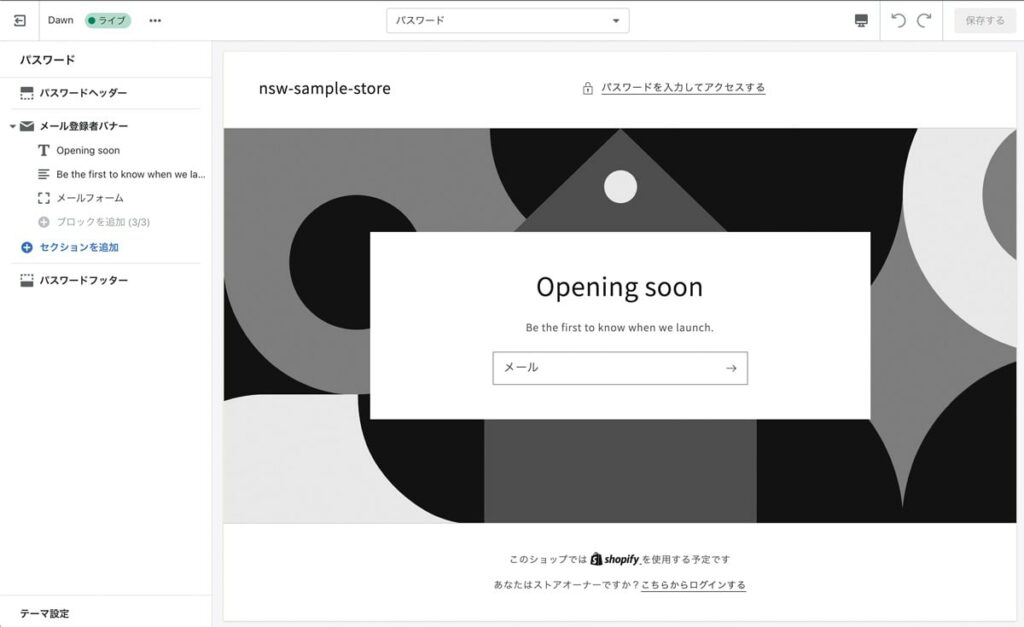
password protection page
Dawn can still be the default, but if you are expecting a maintenance close after release, it is better to implement pages that follow your brand tone & manners.
Click here to purchase the introductory book on Shopify theme development that we produced at our company.
We do not have any plans for printing after the sale at this time, so if you would like to read a printed book please pick us up as soon as possible.

- Author: Sayaka Kawashima
- Publishing: Non-standard world, Inc.
- Number of pages: B5, 248
- Price: 3,850 yen (tax included) * Packed with PDF version, free shipping