Say goodbye to manual website updates: Speed up development with DeployBot and GitHub Flow

Hi. I'm the engineer Kawashima.
Suddenly, everyone involved in creating and updating websites.
What is the public flow of a website for you?
At the site production site where I was involved before, there were many opportunities to do manual work using FTP software.
There's a lot of mistakes involved in manual work, like forgetting to pick up the files you need or having no backups to get them back when something went wrong after publishing.
That said, the most efficient thing is to automate it.
Nonsta uses a combination of DeployBot (deployment bot) and GitHub Flow to automate site publishing, error detection & trouble-time backups as well as streamline site creation.
Contents [ hidden display ]
DeployBot
A service that works with a git repository and publishes (deploys) pushed files to the specified server. DeployBot official site is here.- Deploy a git pushed file to the specified server automatically or with administrator approval
- Once deployed, you can revert to previous state with just one click.
- The chat tool will tell you if there are any deployment errors.
- Development is easy because different branches are linked to each production and test environment
- Free Up to One Repositories, Starts At $15 For The Cheapest Plan
DeployBot configuration screen introduction
Each repository is displayed as follows in DeployBot.
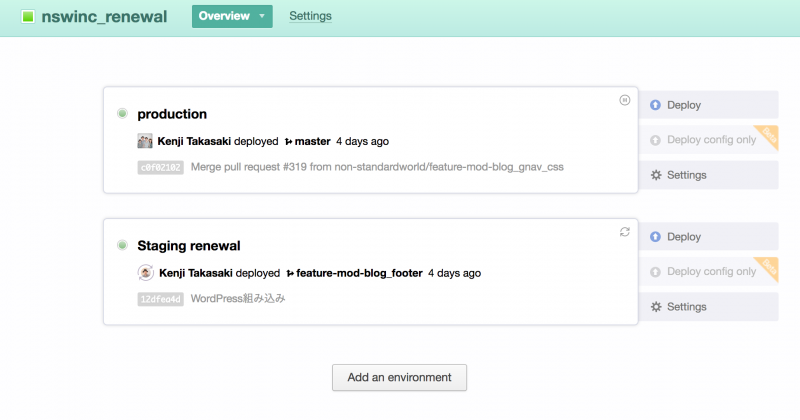
Production and test environments can be created separately, configurations can also be separated: with non-sta, the testing environment is fully automated, and production environments are approved and deployed by the administrator in one click.
Also, on the repository settings screen you can choose to link servers, set notifications and select a Git branch to connect with.
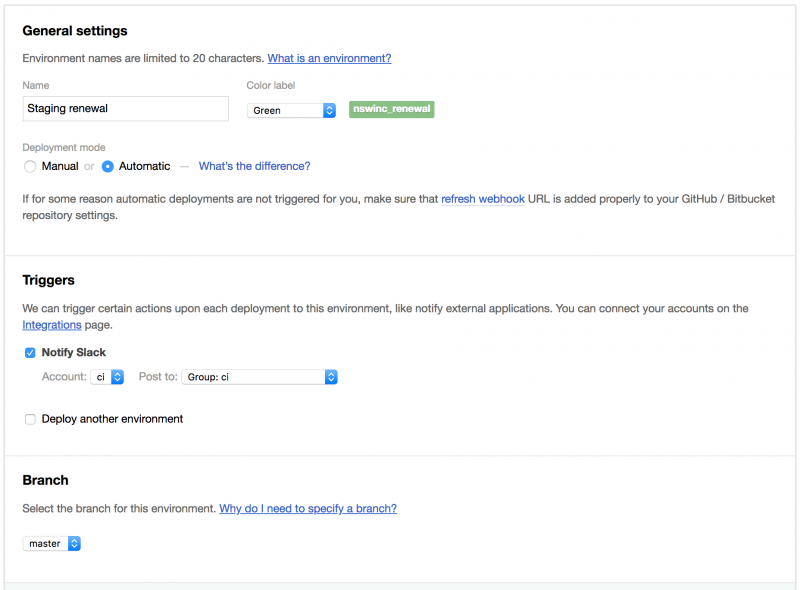
Personally, this branch selection feature is pretty good. Nonsta is working on a git operation method called "github-flow", but it's quite compatible with github-flow and DeployBot.
GitHub Flow
This is a simple git operational workflow advocated by GitHub, created with the assumption that small features can be quickly developed and exposed to the public.
GitHub Flow Operations Rules
The basic rules for GitHub Flow are as follows:* If you use GitHub
- The master branch always makes it reflectable
- New work is done on a branch created from the master branch (the branch should be named to represent what it does, for example: feature-mod-header_css = CSS modification of header).
- The work branch pushes regularly
- Send a pull request when you want feedback or are ready to merge into the master branch
- If there is no problem with your work, approve a pull request and merge it into the master branch
- The content merged into the master branch will be deployed (in production) immediately.
Thus, the master branch and GitHub Flow, which is being developed on multiple working branches, can easily be combined with DeployBot, a branch-by-branch deployment.
DeployBot Combines GitHub Flow to "faster and less error prone" development
Here’s a non-sta example:What happens when you add a new slider to the top page of an already published website...
- Create a working branch from the master branch.
Since the branch name is good to know what you are working on, let's set it as feature-add-top_slider (=functional development - new addition - top page _ slider). - The work branch pushes regularly while additional coding the slider.
- Now, before a pull request... I want to check the behavior in my test environment.
Here we will access DeployBot and tie the test environment to this working branch.
* This process is skipped for tasks that do not require display confirmation, such as wording and link destination correction. - Work is deployed to the test environment.
If there is a fix, push again and the fix will be automatically reflected in your test environment. - If you need feedback, or decide that it can be merged into the master branch, we will send a pull request.
Repush if there is a fix in the review. - If there is no problem, the reviewer will approve a pull request and merge it into the master branch.
At this stage, we ask our client to check the test-up. - Once confirmed, deploy the master branch from DeployBot with one click.
There is no need to forget to raise the file or worry about ancestral reversion, it's published! - If something goes wrong in production after it is published (although rarely), we’ll get back from DeployBot to the previous state and debug it.
The above is a series of flows.
Development is done in small increments, so there are few conflicts between branches and the master branch has little to worry about being reborn; it can be efficiently and quickly produced.
instead
No one makes mistakes, and what we can do is not make a mistake at all, it's to have a mechanism that makes it hard for you to make mistakes and get things back up quickly when something happens.
By enabling these protections with DeployBot, and by working efficiently on GitHub Flow, we are focusing our efforts on more important things such as improving the quality of our site.