Preventing website regressions with GitHub

Hello, I am Sato of non-standard world.
If you’re in charge of the web, there are many people who have been reluctant to do so once or twice.
In CMS, there are many things that the update history remains on the system side, but for static files such as HTML and images, it should be troubled by update management. Many people in charge of managing the update history in Excel etc.
Contents [ hidden display ]
Git is a version control system to prevent ancestral reversion
In order to prevent ancestral reversion of websites, it is recommended that you use the version control system "Git".
Using Git provides the following benefits:
- You can automatically and accurately record "who, when, where and how you have changed" simply by doing a "commit" operation on an update.
- Those update histories can be viewed at any time from the "commit history".
- If a ancestral return is likely to occur, an error called "conflict" will be displayed so that it can prevent the ancestral return beforehand
At our production company, we often use this mechanism to version the source code. While there are some initial hurdles to getting used to the concept of Git, it is a very useful one once you remember. There are also many applications that can be intuitively manipulated so you don't have to know about engineering, and I recommend that you consider using them if your company's web team is in charge of updating them.
For an overview of Git, see this site:
Getting Started With Git: Use Version Control
GitHub, a cloud service for multi-person updates
problem caused by a collaboration of multiple people
- someone else overwrites a file that has changed in an outdated file without notice)
- the same file can be changed by a different person at once
- a change someone makes that affects another page)
- You have to make a list of files you want to upload when it is reflected in production.
when dealing with the problem manually
If you are manually dealing with the above problems, you will have to take the following steps:
- share each update history by e-mail
- For files that someone is likely to be working on, check before work
- record an update in Excel
How about it?
It can be said that it takes time and is an inaccurate method that makes human error easy to occur.
GitHub Can Kill Collaboration Troubles
Git, a version control system, can be managed on cloud servers. GitHub With the help of “Analysis” you can solve problems as described above at once.
- Centralize and share source code so that collaborators can always edit based on the latest source code
- automatically record who made the changes and view them in a list)
- Multiple people can edit the same file and use a dedicated tool to manage how changes are integrated.
- In addition, GitHub will work with production servers to automatically reflect changed files and revoke public ones.
GitHub Screen Image
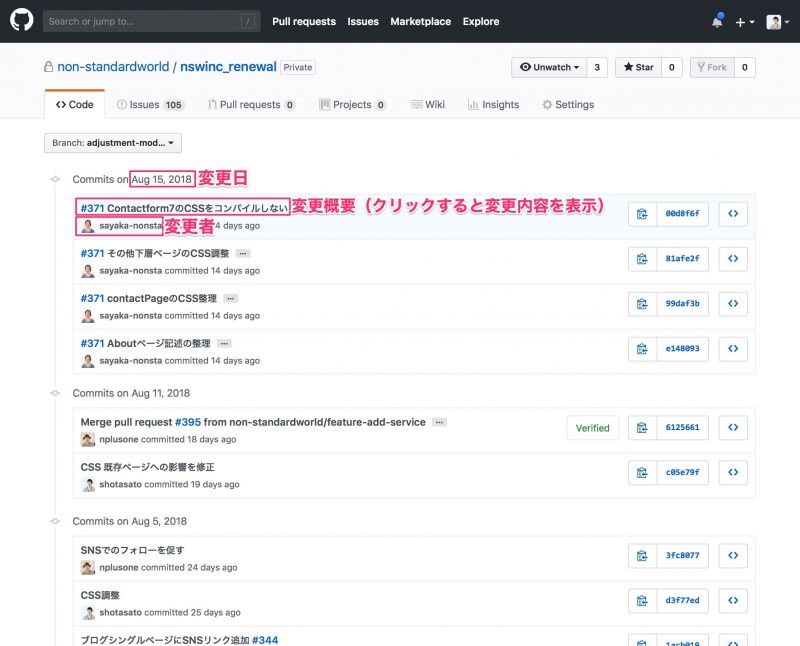
List of Change History
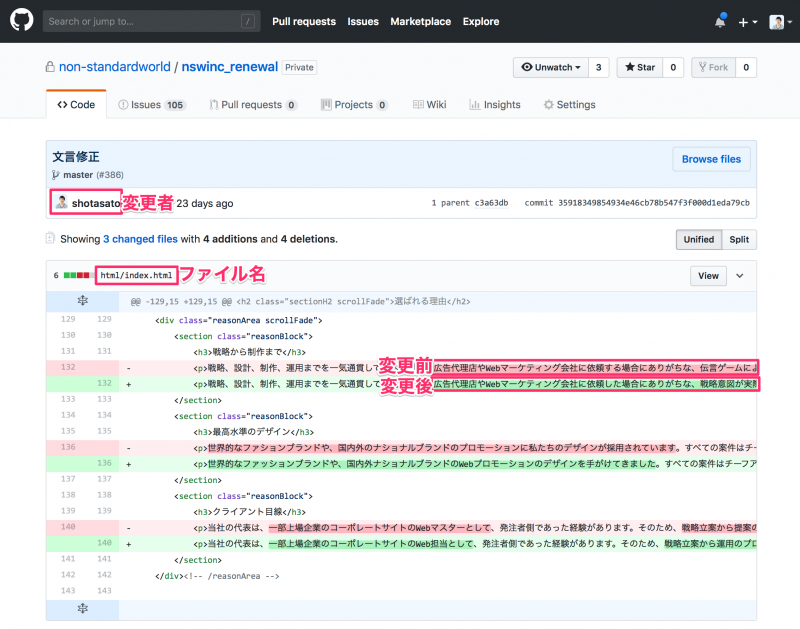
Details of change history
The Cost of Using GitHub
Git itself is free, but GitHub for the cloud service costs $25 per month for up to 5 users (as of August 2018).
In addition, if it is NG to store the data of a website on an external cloud such as security policy, there are also types of Enterprise plans that you install and use on your own server for $21 per user per month.
Summary
While ancestral reversal is a serious problem in website management, manual countermeasures are very difficult and mistakes will always occur.
Create an “environment” that doesn’t make mistakes, rather than being careful not to make them.. Git and GitHub are tools that will always contribute to this.
I hope that all web administrators will create an environment where they can focus on the content (content) to be updated, and realize efficient Web management.


「 Solving the troubles of corporate site personnel! In the “Contact Us” section, we are looking for questions and questions that corporate web personnel have on a regular basis.
For those who have introduced questions on our blog, we will present you with an original postcard set.
Please feel free to contact us for any small questions from the following “Commentary Sending Form”.
*When posting a blog, please be assured that the company name or your name will not be published.

postcard set image
Pictures and contents may change.