
Understanding the relationship between themes and apps to get more out of Shopify

This article is an introductory book by our company on Shopify, Hello Shopify Themes: A Guide to Shopify Theme Development Here's an excerpt from .
It’s not just the theme that helps you customize your store.
At Shopify, we offer a wide variety of “apps” to extend our store functionality.
By combining themes and apps, we will expand the functionality that can be achieved with themes. In this chapter, we will introduce what we want to consider when using an app and a list of recommended applications for theme development.
Contents [ hidden display ]
Relationship between Theme Development and Apps
There are a number of apps available on Shopify, including the ability to publish delivery documents, specify shipping dates and times, and wishlists. You can leverage them to greatly extend store functionality. Many features that cannot be achieved by theme alone can still be combined with an app, but adding too many applications is not good at all.
Most apps are paid (on a monthly basis, or sold-out), and some apps add JavaScript to the theme, so if you increase too much, it will affect the display speed and performance of the theme.
Simple features can handle themes only well, so if you want to add something new to your theme, consider a more effective approach from both the app and the theme implementation side. In this section we will show you what I would like to see in order to make better use of apps.
Shopify App Store
The app is added to the store from “Shopify App Store”.
Depending on the app, its features and prices vary, some with multiple pricing plans or free trial periods.
Shopify App Store
https://apps.shopify.com/
Once you’ve migrated to the Shopify App Store via the store management screen, it automatically logs into your Shopify App Store and allows you to quickly add apps to your desired store.
Some apps are not available in the development store, please transfer them to merchants and add again.
Theme-App Integration
There are many different types of apps, but this section mainly refers to “apps that affect the appearance of your store.” Imagine an app like adding a delivery date and time designation form on your cart page or adding user reviews on product pages.
Apps that affect the store appearance and underlying theme can be integrated with themed in three ways at installation time:
- app block
- embedded app
- Other cases
app block and embedded app 0" is a new mechanism added along with OS 2.
The third one was roughly summarised as “other cases,” but until app blocks and embedding apps were added, the integration specs for apps and themes really varied from app to app. Installation flows on each application were different, sometimes requiring manual adjustment of them, and they were introduced to solve that complex situation: App Blocking & Embedded Apps.
app block
By using the app block, you can add an application function to any part of the theme by operating a theme editor.
However, app blocks are only available for OS 2.0-enabled themes. Strictly speaking you need to support JSON templates and @app types of blocks. Be careful when creating your original theme: After installing an app blockable app in the store, you can call a block from either “Add Section” or “Add Blocks” in the Theme Editor.
Just like regular sections or blocks, you can add, delete and sort Liquids without editing them.
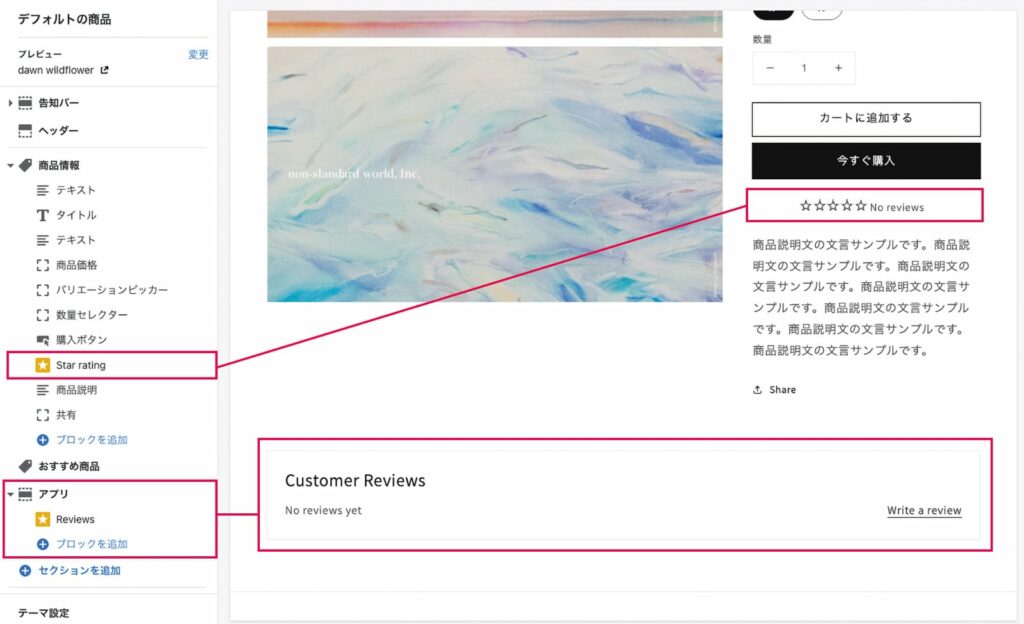
Shopify’s “Product Reviews” app has been added to the theme as an app block. The Star rating and Reviews sidebar will now be available for apps blocking
embedded app
The embedding app is similar to the App Block in that it adds an app by operating a theme editor: after installing your apps into the store, you can select which one to enable within the theme from “Theme Settings” in the theme editor.
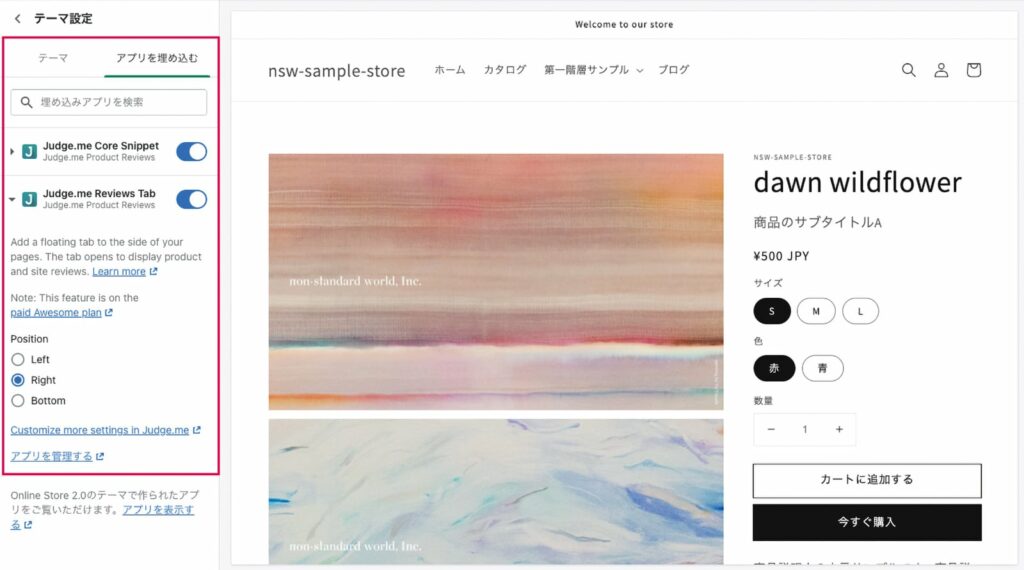
Judge.me Product Reviews' Embedded App Setting
Unlike app blocks, embedding apps can be used on unsupported themes in OS 2.0; instead they cannot be freely repositioned or combined with dynamic sources such as metafields.
Apps that have functions independent of page content, such as chatbot-like apps that always appear on the screen are provided mainly as embeddable applications, some with integration methods for both app block and embedded apps.
Other Cases: Direct Addition to Theme Code
Lastly, it doesn’t support app blocking and embedding apps.
As mentioned above, the theme integration flow of these apps varies from app to app, so it's hard to say in general, but a relatively common typology is that they automatically add the Liquid and JavaScript descriptions needed to run an application within their themes.. As of December 2023 there are fewer apps that don't support App Blocking & Embedded Apps, but here we will show you some things to keep in mind when maintaining older themes or applications.
Notes When Adding Apps That Influence Theme Code
No matter what app you add to your store, check out the Shopify App Store for feature descriptions and reviews so that apps that don’t have support or go down frequently can be avoided.
In addition, please pay attention to the following when installing traditional apps that are not compatible with OS 2.0.
intersect the operation check process in a development store
Avoid installing apps on production stores in production without any validation at the development store, as additional code can cause layout collapses or behavioral malfunction for applications that make changes to live themes.
If you can verify and modify the process of running without problems, whether the function is fulfilling your request or how to uninstall it into a theme in advance at the development store, you will be able to smoothly introduce it into the production store.
grasp changes made to the theme of
Try to figure out how the theme code has changed for your app in order to make debugging easier when something goes wrong after you introduce it.
Downloading theme files from the Shopify CLI or Theme Kit and adding them to your git management is one way, but you can automatically track change history by integrating live themes with GitHub.
regular app arrangement and uninstallation
Repeat your apps regularly. Unnecessary app related files and JavaScript can have a negative impact on the display speed or maintainability of themes, but take care to remove them too.
Changes made to the theme by an app can still remain in the theme even if you delete it, and when left alone, old code or files that are unused within the theme tends to be a hotbed of bugs.
If you’re a typical app, there is an uninstallation mechanism for app-related files (and code that has been changed by the app) on your admin screen. Run Uninstall before you delete it. But if merchants are directly adding or deleting apps from their store, then they tend to miss out on the process of uninstalling them. In such cases, keeping track of the theme change history with git can help in debugging and maintenance.
behavior associated with theme switching
Many of the apps that affect theming will add app-related files to a given theme (or live theme) when installed.
Therefore, there is a case that an app-related file added to Theme A does not exist in the theme library.
If you’re switching multiple themes to live on a daily basis, be careful not to expose any theme that doesn’t have an app-related file as a live theme; some apps will automatically install the app-related files into new live themes if they detect switching between them.
Supplement: Installing an App on the Original Theme
For an official theme like Debut or Dawn, the integration of themes and apps is relatively smooth, but sometimes third-party or original themes require manual Liquid adjustments.
The manual installation method is generally posted on the app support page or FAQ, so please refer to it.
Apps Extend Theme Potential
I’ve been talking about apps for a long time now, but they are still very useful in the development of themes.
Even if it is difficult to implement by the theme alone, there are many functions that can be realized when combined with an app.
Understand the characteristics of your app and use it actively.In the next section, we will introduce apps that are particularly useful for store operations and theme development.
Click here to purchase the introductory book on Shopify theme development that we produced at our company.
We do not have any plans for printing after the sale at this time, so if you would like to read a printed book please pick us up as soon as possible.

- Author: Sayaka Kawashima
- Publishing: Non-standard world, Inc.
- Number of pages: B5, 248
- Price: 3,850 yen (tax included) * Packed with PDF version, free shipping