
Pitfalls we encountered when implementing headless commerce with Shopify and Gatsby

it's been a long time! this is engineer kawashima.
It’s been nearly 10 months since I posted my last post while I was trying to implement it on a daily basis.
But Shopify is changing quickly, so I’d like to update my previous posts.
(I hope to resume the headless commerce commentary in the middle of a series soon.)
In this article, I would like to share some of the pitfalls that I’ve found in real-world projects for those who have already implemented headless commerce (Shopify + Gatsby).
While there are still few Japanese information available, I hope it can be used as a clue.
* The technical structure of this article is as follows.
- Frontend: GatsbyJS
- Backend (EC System): Shopify
- Build & Deploy: Gatsby Cloud
- Hosting: Firebase
Contents [ hidden display ]
If the number of products is large, the response to the gatsby-source-shopify plugin becomes unstable.
Gatsby has a few starters that are optimized for building headless commerce.
as we've covered in previous articles and the starter i'm using gatsby-shopify-starter That's it.
This is very useful, but the Shopify information acquisition plugin used in this starter. gatsby-source-shopify The "timeout" is sometimes unstable and repeats a time-out error.
It is an event that occurs mainly in stores with a large number of products, and it does not matter so much when developing new store, but I couldn’t identify the cause.
js, it seems that there are cases where the paginationSize value of the gatsby-source-shopify plugin is specified and resolved.
// Number of records to fetch on each request when building the cache
// at startup. If your application encounters timeout errors during
// startup, try decreasing this number.
  paginationSize: 250,
But sometimes it doesn’t work, so if you want to revamp your existing Shopify store headless, you can either verify it in advance or consider other plugins.
* The following issue has been reported on the plugin's GitHub.
[gatsby-source-shopify] timeout error on build | https://github.com/gatsbyjs/gatsby/issues/21110
[gatsby-source-shopify] Timeouts during load; Limit of 250 is too large? | https://github.com/gatsbyjs/gatsby/issues/14300
Getting metafields information from gatsby-source-shopify
It is also a pitfall of the gatsby-source-shopify plugin.
The gatsby-source-shopify plugin does not allow you to obtain Shopify metafields information by default.
NOTE: By default, all metafields are private. In order to pull metafields, you must first expose the metafield to the Storefront API. https://www.gatsbyjs.com/plugins/gatsby-source-shopify/#how-to-use
To get metafields information, you need to publish the metafields information using GraphQL Admin API in Shopify’s Storefront API. Shopify’s Official Tutorial Is Here But since the detailed procedures are not explained, it took a lot of time.
As a concrete procedure, the following is required.
- In a Shopify store that wants to get metafield information Installing Shopify GraphiQL App make up
- Create a MetafieldStorefrontVisibility Record on Shopify GraphiQL App *Rewrite the Query Variables as needed
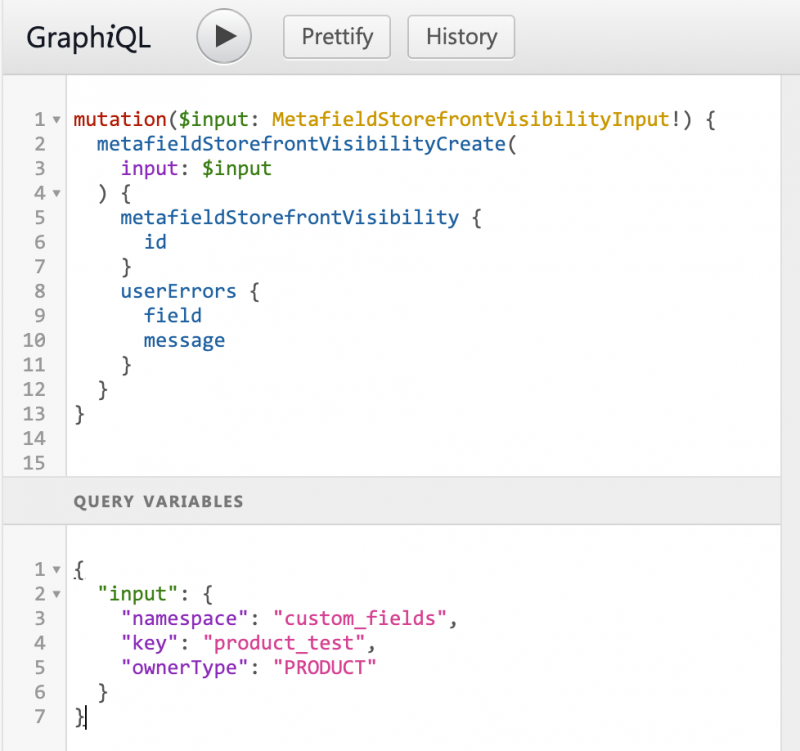
The above steps allow metafields information to be whitelisted and accessed via the Storefront API.
However, when I tried it, there was a time lag until it was accessible, so if it doesn't work then I may try again the next day or later.
if metafields information is available http://localhost:8000/__graphql You can check the value from the screen, so please update your GraphQL description in Gatsby as appropriate.
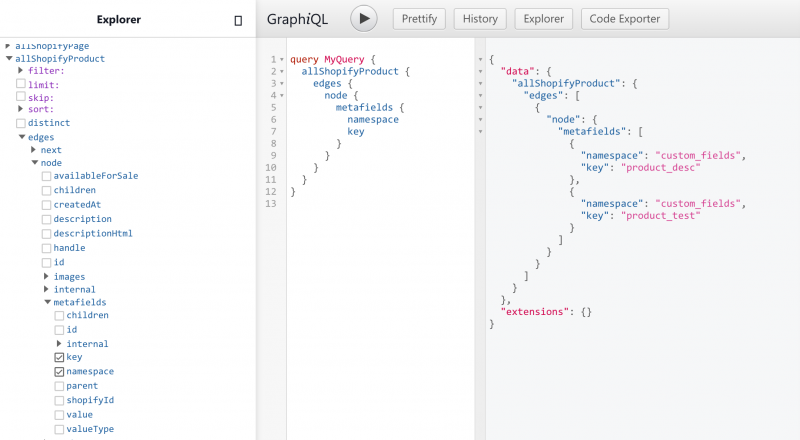
The following forum post is an implementation of Vue.js, but the process to resolve it is helpful (it seems that there may be failures due to a lack of API access rights for private apps).
Metafield Storefront Visibility Record | https://community.shopify.com/c/Storefront-API-SDKs/Metafield-Storefront-Visibility-Record/td-p/572701
Adobe Fonts’ Dynamic Subset Can’t Read
I met him on a real project, and he was quite upset...
Plug-in for Web font loading " gatsby-plugin-web-font-loader If the Adobe Fonts web project contains a Japanese font, it will not work.
When using Japanese web fonts in Adobe Fonts: As officially stated by Adobe, you need to specify a dynamic subset However, it seems that the gatsby-plugin-web-font-loader plugin does not support dynamic subset loading.
Since there was no problem with using an English-language web font, it was solved by stopping using Japanese Web Font.
(If you know any good ways, it would be very helpful if someone commented...)
Note that even though gatsby-plugin-web-font-loader is the most downloaded web font plugin in Gatsby, it's already stopped maintenance. 。
Gatsby Official Web Font Usage Guide uses this plugin to load Adobe Fonts For this reason, it is more likely to be made as documented. Please be careful.
apology: it's solved.
This problem is solved by adding a script tag in the head without using Gatsby-plugin-web-font-loader!
Since Gatsby can't write a script tag in its own form, it says: gatsby-plugin-react-helmet Combination of ".
Use React Helmet to write Adobe dynamic subset loading scripts in a file that defines site common parts such as src/components/layout.
<Helmet>
  <script type="application/javascript">
    {`
      {
        (function(d) {
          var config = {
            kitId: 'ここにID',
            scriptTimeout: 3000,
            async: true
          },
          h=d.documentElement,t=setTimeout(function(){h.className=h.className.replace(/\bwf-loading\b/g,"")+" wf-inactive";},config.scriptTimeout),tk=d.createElement("script"),f=false,s=d.getElementsByTagName("script")[0],a;h.className+=" wf-loading";tk.src='https://use.typekit.net/'+config.kitId+'.js';tk.async=true;tk.onload=tk.onreadystatechange=function(){a=this.readyState;if(f||a&&a!="complete"&&a!="loaded")return;f=true;clearTimeout(t);try{Typekit.load(config)}catch(e){}};s.parentNode.insertBefore(tk,s)
        })(document);
      }
    `}
  </script>
</Helmet>
As far as online posts go, if you write using Helmet, it seems that there are cases where the Gatsby site is running locally depending on its configuration but not deployed to a server.
without using helmet gatsby-ssr.js haha. html.js And it could be done by customizing the way you do things.
Reference: How to add 3rd party script in your gatsby website
It’s worth noting that if you use Google Font instead of Adobe Font, you can self-host the font using a plugin called Font Source.
If you have an opportunity to verify it, I'd like to try it :)
Reference: How to Read Web Fonts in Gatsby.js How to Self-host Fonts with Gatsby
Check leaks around external scripting and OGP
Finally, as a reminder when using gatsby-shopify-starter.
This starter is a plugin for Google Analytics in the installation phase. gatsby-plugin-google-analytics It also includes a tracking ID.
{
  resolve: gatsby-plugin-google-analytics,
  options: {
    trackingId: "UA-134421805-1",
    anonymize: true,
    respectDNT: true,
  },
},
When checked later, the response tends to leak because it looks like something has already been set in a glance.. Don’t forget to replace it with an identity for your client.
js for OGP writing has also been included since the installation, but as it stands (such as og:url or og:image), let's not forget to customize it before release.
instead
That’s what we shared with you about our headless commerce implementation.
Gatsby and Shopify headless implementation information is still scarce (*even in English), and there are many cases where you can't find a similar case if something catches you.
Especially when it comes to the Gatsby plugin, it seems that the shortest way is to look at the GitHub issue of the developer and try-and-error to find a cause.
Fortunately, both Shopify APIs and Gatsby plugins are getting daily updates, so it may not be working right now to solve this in the future:)
We hope it will help you to implement headless commerce.