Prototype Design: A Non-Star Web App Development Flow That Lets You Try and Error

Hi. I'm the engineer Kawashima.
It's raining completely in Tokyo. I feel like this spring has passed in a moment.
Now, this is the fourth special feature to introduce Nonsta’s web app development flow.
In our previous article, we introduced the Javelin Board KJ Act, a method to verify the prerequisites for issues. So far in a series of articles, it has become clear who and what problems are being solved. Next, I'm going to delve into "how do you solve them?"
Even in the process of deciding what to make, verification is very important.
Even if you’re working on an app early, it won’t be widely accepted if the app is not comfortable to use or features that users aren’t looking for — because they have identified issues and assumptions.
Therefore, we make prototypes and MVP (*Minimum Viable Product) first, and set up a process to ask users for their opinions before we start development.
At this stage, by verifying the functionality required for users, it is possible to create apps more efficiently by reducing the number of rework and post-release failures.
Contents [ hidden display ]
Types and Features of Prototype
Prototypes in web apps literally refer to prototypes for an app.
There are various types of prototypes, and the degree of perfection is not uniform.
For example, the prototype used for creating an app is as follows.
The simplest prototype you can create with paper and pen. You often make it before you decide on a specification or feature, without any special skills or knowledge so that anyone can participate in prototyping
Prototypes created using a dedicated tool. You can check the screen transition and the operation at button press time, there is an operation feeling close to that of app real-world products. It requires mastery of specialized tools and it is not suitable for creating multiple people.
High-precision prototypes with provisional functions such as posting messages, which can be used to confirm operations that are more realistic but require a lot of man-hours because design and implementation is required.
If you change the screen or add new features after development is started, it will not only waste the built-in design and program but also increase the cost due to redesign and delay in delivery.
In that regard, prototypes are premised on prototyping. Because they can be created and modified in a much shorter period of time than the actual production, users can experiment with features or screens while taking in their opinions. It takes some time to get started, but it is more efficient because there will be fewer rework and post-release failures.
prototyping benefits to the orderer
In addition, for clients who order app creation, there is an advantage that it is easy to have the image of a real application by interfering with the prototype process.
It’s hard to imagine how the app works, even if you keep meeting and check your blueprint or design over and over again.
Prototypes can actually be touched and checked, making them much easier to image. Even when new challenges are found such as “no need for this action” or “the function is more convenient to fly from the menu,” they’re smoother and more costly and time-consuming than correcting that it’s different from what you thought after development.
Prototype Kanban Board for Visualizing Design Process
Such prototypes also require a design process.
If you fill in all the ideas that came out of this verification process, your prototype will fail and it’s hard to get user feedback.
After selecting features and designing the screen layout, prototypes become a good basis for verification.
In order to proceed with prototype design, we utilize the "Prototype Kanban Board".
Prototype Kanban Board is a kanban operation method optimized for creating and verifying prototypes, introduced in Masayuki Tadokoro’s book “Educational Science.
* About 'Kanban.'
Kanban is a method to increase the operational efficiency of an entire team by visualizing the team’s work tasks and progress on one board, which originally originated in Toyota’s production management system has been incorporated into software development and widely utilized.
It is mainly operated by the following procedure.
- Separate Kanban in multiple lanes for each team workflow
- To move a card of task information in one direction between lanes for each progress.
About the flow of business using Kanban, this article It's easy to understand:)
there's a lot of whiteboarding in kanban. notion Each member's operation is synchronized in real time, so you can fill out and move cards on your computer while looking at one board on a large screen.
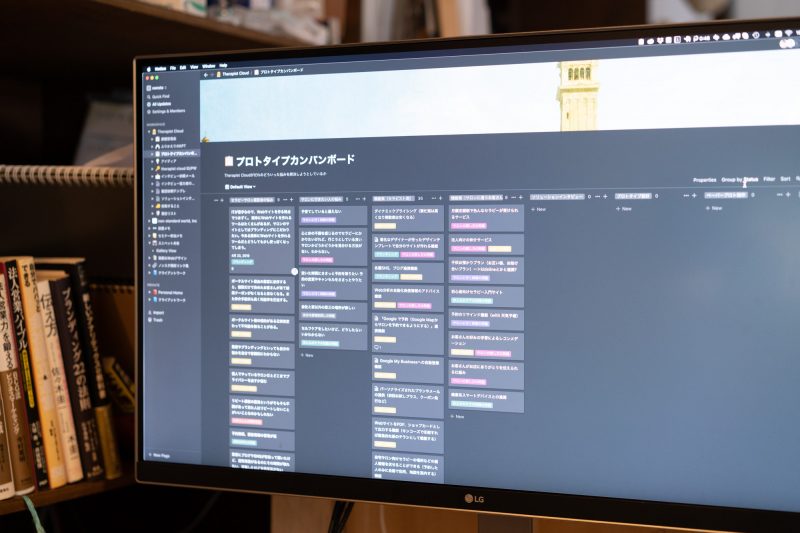
Below is a prototype Kanban board that we are actually running on notion.
proceed with prototyping in an effective process
Prototype Kanban boards can be efficiently prototyped by working along the board.
The flow of work is roughly divided into three steps.
verification of really needed features
In the first step, we will select which features to incorporate into our prototype.
We place the cards of issues that have been identified by the validation so far in a starting lane, and we blast out the solution for the problem within our team, then we pick up the card from which features we really think are needed and put it on a second lane.
At this stage, the board provided information on “problems to be solved” and “functions that are considered necessary.
This is likely to go into design soon, but we will interview the user once here.
We will further verify through interviews what features we think are really good for our users, and which ones are most needed.
Once you have the results of your interview, prioritize cards with features that confirm user demand and place them in a third lane.
Now you can see the framework of features that should be included in your app:)
Prototype Design and Creation
Once you’ve decided on the features that will be included in your app, go to the next step and design a prototype screen.
It's not that we start designing at this stage, but rather the design of elements placed on a screen.
We’ve created a number of designs, including what we can do on the first screen, which screens will allow us to access high-priority features, and how our entire app will transition.
Information on the design plan is placed in a fourth lane.
And once the design plan is ready, create a paper prototype based on it.
This is done by the whole team, and information about paper prototypes that can be created is placed in a fifth lane.
* Paper prototyping will be introduced in detail in the next special article.
When you see the approximate shape of your app in a paper proto, it will be dropped into a more detailed tool prototype.
Toolproto allows you to see screen transitions while actually operating your smartphone or PC, and this information is placed in the sixth lane.
prototype interview
In the last step, we will do a user interview again.
We will let you touch the tool proto that we created in the previous step and have a sense of operation close to reality, and verify whether there are any operational questions or dissatisfaction.
Of course, modifying the prototype based on user feedback would be better if new features were introduced, so add a card to the “features you think are needed” lane and repeat the prototype design process again.
It takes a lot of time to do these steps in production, but because prototypes can be created quickly, it is possible to get closer to the apps you need while repeating interviews and modifications.
instead
Prototypes” seem to be a bit machine-like, or something that doesn’t seem to have much to do with the web.In fact, we don’t have any prototyping processes for contract production of websites.
However, unlike websites where providing information is the main purpose, web apps have various purposes and need functions to achieve them.
It takes a lot of time to develop and debug, like registering as a member, logging in, paying for payments, and sending messages.
Therefore, when the development progressed and it became a situation where “we did not need this function” or “we want that feature instead”, we can’t easily change direction, so even those who ordered will be burdened by us.
That’s why in web app production, prototypes that can be produced much faster than the actual work are effective.
Using prototypes to repeat trial and error of functions/screens, and to fully incorporate the user’s voice at this stage, even though it seems like a distant route, it leads to more efficient creation of web apps that are required by users.
In this article, we introduce the features of prototype and prototyping kanban board as an operation method.
Next time, we will introduce “Paper Prototype,” a procedure for creating concrete prototypes.
reference book
Masayuki Tadokoro "Startup Science" by Nikkei BP
Impress of Takayuki Fukazu and Hiroaki Hagino's Prototyping Practice Guide: Efficient Design Method for Smartphone Applications