
From attracting customers to supporting them: An introduction to the web marketing tool HubSpot

Hi. I'm the engineer Kawashima.
we've been working on marketing support tools since the other day. HubSpot I started using (Starter plan).
Here's a summary of the features and capabilities of HubSpot, the practical benefits and disadvantages that I felt when introducing it, what I wanted to know before adopting:)
Contents [ hidden display ]
What is HubSpot?
HubSpot is a web service that allows one-stop marketing processes (customer acquisition, customer service and customer pursuit) on the Web.
Since it is a tool dedicated to supporting inbound marketing*, if you are a company that broadcasts content on owned media or social media, you can use HubSpot more.
*Inbound marketing
A marketing method that aims to inform the company of its existence and let customers visit it by sending meaningful content for customers. It's also described on the official HubSpot website. 。
HubSpot Features
Adobe’s recent acquisition of Marketo There are a number of marketing support tools, such as .
The HubSpot we introduced has the following characteristics compared to other tools:
- specialized in inbound marketing
- Administrative screen design is easy to see and use
- have all the necessary tools for one's web marketing process
- With a well-organized marketing model, it leads to standardization of operations.
The main characteristics are: HubSpot Gets All The Features You Need For Web Marketing Yes.
For example, if you are using different marketing support services for sales and customer support, it will take a lot of time to sync your data and make it harder to work together.
In that respect, HubSpot allows you to complete each process of attracting customers, customer service and tracking on HubSpot.
Since you can proceed according to the basics of marketing measures, it is easy for web marketing beginners.
HubSpot's Main Features
HubSpot consists of the following four software pieces, along with changes in customer relationships:
- Marketing Hub : MA (Marketing Automation) tool
- Sales Hub : Sales Force Automation (SFA) tool
- Service Hub Customer service support tool
- HubSpot CRM : Customer Relationship Management (CRM) tool
It's full of horizontal characters, and you get a lot of laughter. There are many unfamiliar words, but it becomes easier to understand when thinking about them as a set of tools that follow the trend of deepening relationships with customers. please also include the terminology described later. )
Collect customers (marketing), support engagements (sales) and maintain good relationships (customer service and customer relationship management).The functions required at each stage are integrated into the four above-mentioned software.
Since the pricing plan exists for each software, you can also choose and sign only what is needed.
The main functions of each software are as follows:
- support for attracting customers on the Web Marketing Hub SEO, social media management, forms and content optimization are all available.
- Web-based customer support be a sales support tool for toB Sales Hub and sales support tools for toC. Service Hub The former has functions such as visualizing business negotiations and transactions, while the latter is equipped with functions like ticket management for inquiries and FAQ creation.
- Supporting Customers on the Web and Management of Customer Data HubSpot CRM By automatically managing customer data, we can streamline and increase productivity of customer acquisition, customer service, and customer pursuit measures. For example, from web-based actions, it is possible to analyze how much a pre-contract customer likes products or services, as well as to conduct measures for more secure customers based on the analysis contents, and since customer interactions are also visualized as data, we can prevent the occupancy of projects and create a system that supports clients across the entire team.
HubSpot Pricing Plan
HubSpot CRM For other software, the following pricing plans exist for each of them:
- Free (Free. Features are greatly limited)
- Starter (From 6,000 yen per month. Basic functions are available)
- Professional (From 48,000 yen per month, and from 96,000 yen per month for Marketing Hub)
- Enterprise (From 144,000 yen per month, and from 288,000 yen per month for the Marketing Hub)
*As of October 2018, the Basic plan has been integrated into the Professional plan since September.
The differences in features available for each plan are: HubSpot Official Site Price List and product information Please refer to the link below.
Terms: MA, SFA and CRM
I'm a bit out of HubSpot, but let me briefly explain the marketing term MA · SFA · CRM. if you're okay, please click here to fly. )
MA: Marketing automation
Marketing Automation is a mechanism that automates marketing routine work with tools.
Examples of routine work include creating a list of prospective customers, visualizing website visitors’ behavior and sending e-mails (remind for goods in carts or notifications related to them) that are mostly managed, measured and operated; however if you try all these things by yourself, it will not only take a huge amount of effort but also make mistakes.
Therefore, the idea of MA is broad: let’s leave what can be automated to MA tools and focus on things that only people can do — such as planning campaigns or creating marketing scenarios.
In HubSpot: Marketing Hub This is the MA tool.
SFA: Salesforce Automation
Sales Force Automation is a system for streamlining sales force activities by means of tools, which can also be translated as a sales support system.
The idea of SFA is to visualize each sales activity performed by a member of the sales team by recording and sharing it with the system.
In addition to being able to utilize know-how that tends to be identifiable across the entire team, it is also easy to prevent troubles associated with leakage and succession because of the easy-to-understand status of transactions and business negotiations.
In HubSpot: Sales Hub This is the SFA tool.
Incidentally Service Hub It is close to the SFA tool for toC, and you can make your customer support activities more efficient and visible by using tools.
CRM: Customer Relationship Management
CRM and Customer Relationship Management (Customer Relationship Management) are marketing methods to build better relationships with customers.
In the past, if marketing was to grow in size, it would only be possible for mass marketing to appeal broadly and with the same content as a whole customer base.
The idea of CRM is to use the power of technology to capture each customer’s behavior and attributes in a small way, and to appeal them accordingly.
MA, SFA and SA have been introduced so far are also technologies to realize CRM.
In addition, CRM is not only for acquisition but also for maintenance; there are many CRM tools that provide a mechanism to develop sustainable relationships with customers and to conduct marketing according to each person so as to become repeaters or fans.
In HubSpot: HubSpot CRM This CRM tool is the basis for connecting each of these tools.
HubSpot (Marketing Hub) Starter Plan
we're going to say HubSpot CRM said he, Marketing Hub We use a combination of the Starter plan.
The following is what I felt in my practice when I introduced HubSpot:
a practical benefit or convenience)
Marketing Hub: Introducing Forms (embedded form, read flow forms)
Marketing Hub Nonsta uses the contact page’s query form and a slide-in lead flow form (download link to the inquiry document) that allows you to create various forms and embed them on external sites.
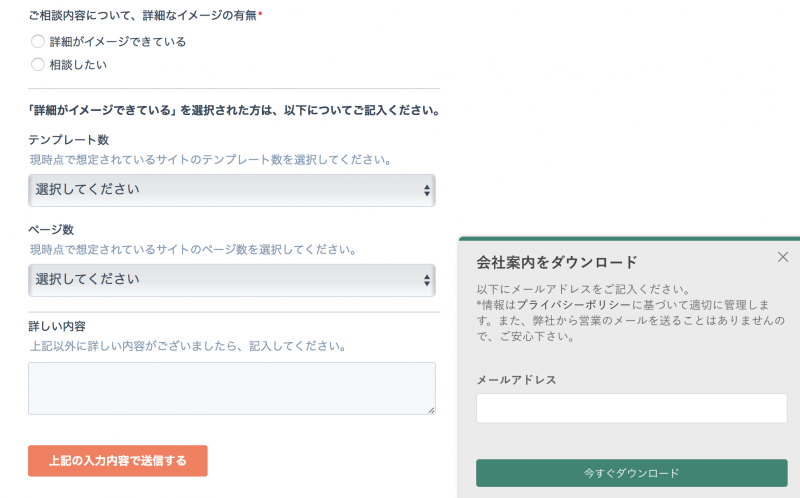
* Note: These forms Marketing Hub it's a free feature. HubSpot CRM But you can use the simplified version, and if it's a free plan, your HubSpot logo will be displayed.
Both are very useful because they do not require HTML coding and can be easily introduced.
However, if it is this alone, you can do the same with form plugins such as WordPress.
HubSpot’s strength is its ability to combine forms with customer management capabilities.
Marketing Hub x HubSpot CRM: Contact Tracking and Integration
The interactions that started with the HubSpot form: HubSpot CRM You can manage it with the contact function.
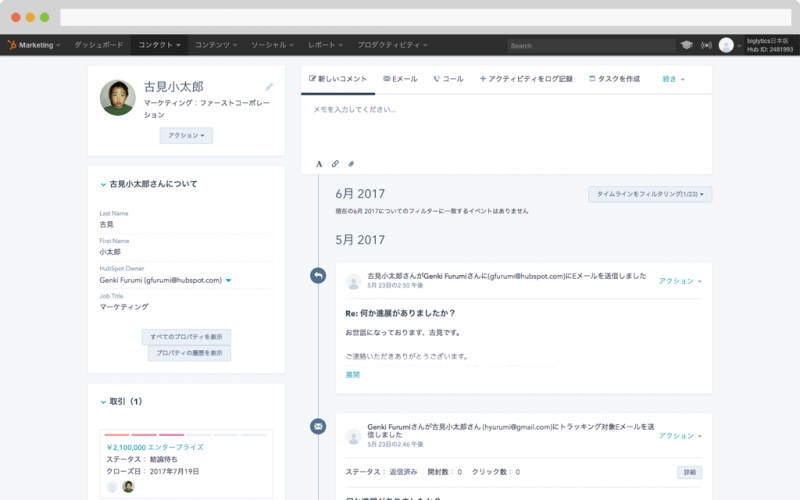
Image Source: HubSpot Official Site https://www.hubspot.jp/products/crm/contact-management
Nearly every form's database stores only the first message sent via a form. You need to find out for yourself which emails are being replied to your inquiry, or any queries that have been triggered by long mail threads. It can be hard work and especially if there is no proper handover of members, you may lose sight of the conversation.
in that respect HubSpot CRM It can be synced with email clients like Gmail and Outlook, so it automatically tracks your reply to an inquiry via a form. You can see the flow after the inquiry in HubSpot, and you don’t have to ask for mail forwarding or additions to your CC address. I’m pretty happy to use this:)
HubSpot CRM: Visualizing User Behavior
In addition, there is also a function of analytics that allows you to check user movements individually in 1to1.

Image Source: HubSpot Official Site https://www.hubspot.jp/products/crm
Google Analytics can track the overall site access, but in HubSpot’s case you will be able to see what users have contacted (what page they are browsing), when they opened their email, and how much interest there is.
Practical disadvantages and inconvenience
This depends on the HubSpot plan, but here’s what I find inconvenience when using a Starter plan.
If you embed it on an external site, you can't customize the design of your form.
Marketing Hub In the Starter plan, you cannot customize forms using CSS (* you can change font and button colors only. Read form changes background color).
Only the form part will be deviated from the design tone of a website, but CSS customization for embedded forms can be done. Marketing Hub If you have a Professional plan or higher, you can customize it using the Form API.
have no confirmation screen for the form
There is a confirmation screen before transmission in the configuration of forms that are often seen on corporate sites, where information will be presented to users and they can return to the input screen if modifications are required.
In HubSpot, there is no display function on the confirmation screen; you can view a Sanks message after the form submission or redirect it to another page.
How to Adopt HubSpot
After introducing HubSpot, if you are using HubSpot functionality on an external website, it is necessary to incorporate the HubSpot tracking code in all pages.
If you do not have this code in place, it is impossible to check the user's behavior data.
Key Takeaways from HubSpot
It’s a marketing support service in general, but you should also be aware of the following points when using HubSpot.
price aspect
HubSpot has a Starter plan starting at 6,000 yen per month, but you’ll have to pay tens of thousands or more per month for full functionality.
I think that this area is a place where the budget changes greatly depending on the scale of the installation destination, but since it is also possible to trial the contents of the paid plan, I think it will be good to check in advance which plan will make the necessary functions available.
security risk
There is a security risk as it connects various types of data to HubSpot.
However, it seems that there are various efforts to ensure safety even on the HubSpot side.
For more information on the countermeasures, please visit our official documentation. It is explained.
Can you assign an operations person?
Unlike CMSs like WordPress, operational tasks such as updates are not happening on the implementation side but it is better to decide who will use HubSpot.. HubSpot automates business operations and measures data, but if you can’t leverage them, your adoption will be less effective.
instead
Until I introduced HubSpot, there were few opportunities for me as an engineer to be conscious of web marketing.
Neither of the interactions that started with an inquiry, how many contacts there were, or what pages each person visiting a website was interested in — I hadn’t seen them before.
By seeing this information visualized across the entire team at HubSpot, I think we can now work on improving our site with a broader view than ever.
If you’ve introduced HubSpot or are considering it, this article is a great help:)