Introduction to Shopify app development — 2024 edition: Basic concepts and limitations to understand before implementation

At our company, we analyze the sales information of customers and develop our own Shopify app to help with consultations.
When building Shopify apps, there were many cases where information flowing through the Internet was outdated or English-only.
Therefore, in this article we summarize what I wanted to know from the beginning and want you to tell me when I entered.
If you know this in advance, it should be able to build smoothly so if you are going to build a Shopify app from now on please read more.
Contents [ hidden display ]
- What is a Shopify app?
- Constraints on Shopify Apps to Be Recognized Before Implementing
- How to Build a Frontend for Shopify Apps
- On the Shopify API
- There are also two ways to request APIs.
- Notes from the Shopify API
- Note: There is a request limit called Rate Limit
- Note: If you want to request more than 2.250 records, you need to either split the query or process it in bulk over time.
- Note: If you want to access your personal information prior to 3.60 days, you need to apply with Shopify
- Note 4. Public apps must receive a webhook to comply with EU Personal Information Regulations (GDPR)
- On the Backend
- About Deployment
- Summary: Our Shopify App Technology Stack
What is a Shopify app?
It is a mechanism to add functions that are not prepared by Shopify standard.
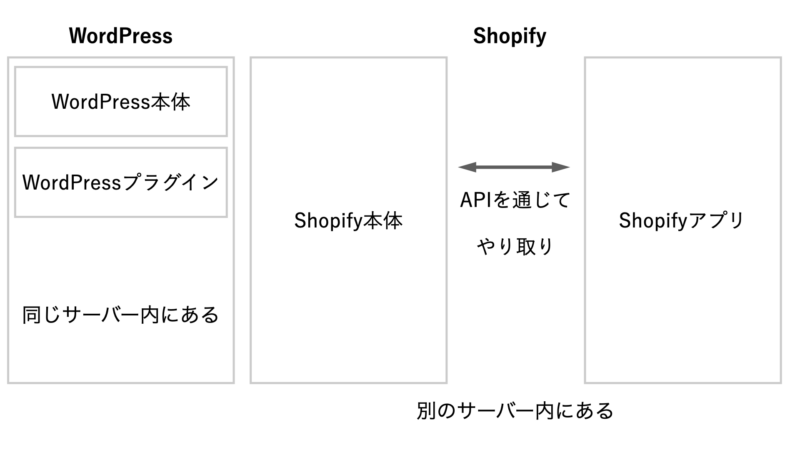
Concept diagrams of Shopify appsThe Shopify itself and the Shopify app are located on a separate server.
Similar to WordPress plugins and concepts, but as a design caveat: while the WordPress plug-in shares server databases with WordPress itself, Shopify apps are web applications independent of Shopify itself and do not share servers or databases with Shopify itself.
The Shopify app and the Shopify itself will look like they are communicating data through an API.
So you can’t directly manipulate the Shopify database from your app.
Constraints on Shopify Apps to Be Recognized Before Implementing
how to publish
There are two main ways to do this:
There is a difference in the implementation method depending on which one you choose, so it's better to decide from the beginning and design an app.
1. Publish as a public app
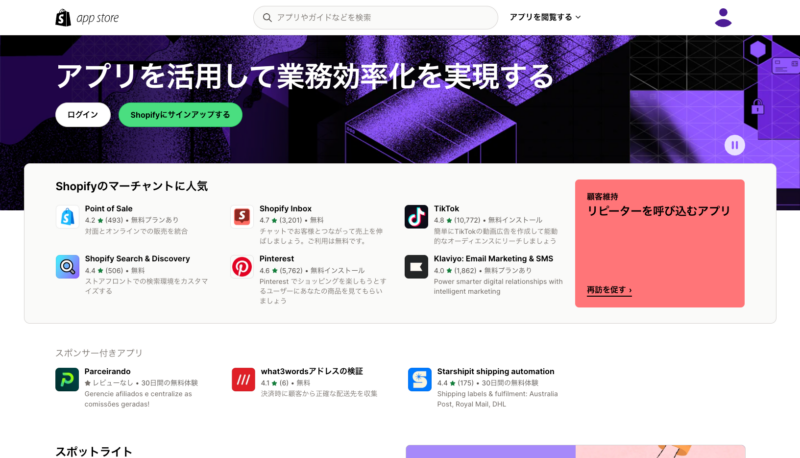
Shopify App Store
It is a method that is widely open to the general user.
Within the public app, it is further divided into the following publishing levels.
- Published on the Shopify App Store
Like the AppStore in iOS Apps, Shopify Apps Shopify App Store There’s an app store that lets you create apps for more people by publishing them there.
It is possible to publish by paid and free.- Shopify’s App Store is private and only open to interested parties
- Select here if you want to install it on multiple stores, but don't want it to be widely available.
It is an image that only people who know the URL can install.
Public App Notes
The Shopify Review in English and More GDPR It is necessary to comply with the EU’s regulations on personal information.
In our experience, Shopify will start screening the day after the application and so on.
2. Publish as a custom app
It is installed only in one store, and there are no Shopify review.
If you want to install it only in a specific store, such as client work, this is the best option.
How to Build a Frontend for Shopify Apps
On the system, we described Shopify apps and Shopify itself as separate web applications, but there are “embedded apps” that look like they’re integrated with Shopfiy’s management screen as a front-end view of the Shopify app, while there is no embeddable app on the front-end side.
Here is a screenshot of the sample.
Embedded App Sample
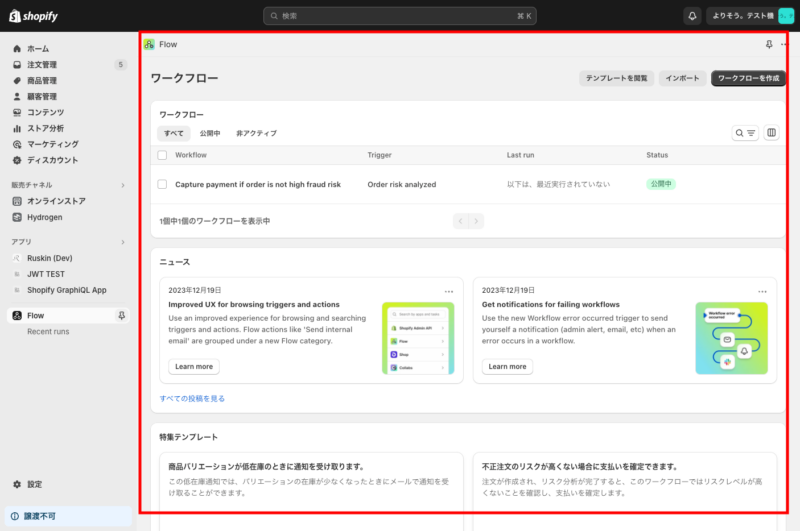
Sample embeddable apps, which are loaded in iFrame on the red frame of Shopify’s Admin screen.
A sample of an unembedded app
It’ll launch as a separate window from the Shopify Admin screen, with an app-specific UI.
Note: When building an embedded app, you need to create a front-end with SPA as a rule
As mentioned above, if you want to create an embedded app (an application that looks like it has been integrated into Shopify’s management screen), in principle you need to create a single-page application (SPA) with no page transition on the front end.
There are security issues with third-party cookies as a reason.
Shopify's embedded app is a mechanism to load the application side screen with iFrame, but it can not record and keep the login status in the app side cookie at the time of the page transition on the app side.
However, even if there is a page transition, it is possible to implement an embedded app by applying login authentication for each page transition.
In that case, at Shopify, JWT(JSON Web Token) There is a method called “SPA”, but considering the man-hours, I think it will be honest to make with SPA.
Also, in an article about the implementation of Shopify app, it should be noted that third-party cookies do not work even if they are implemented as is with old ones written at a loose age.
If you want to create a Shopify app as a web application with page transitions in an orthodox MPA (multi-page application) method, it is better to choose one that does not embed because there are no man-hours to be made by SPA.
Note: Local development requires URL access tools such as ngrok and Cloudflare Tunnel
that local development ngrok haha. Cloudflare Tunnel You need to have an environment where you can access the local host using SSL URL from outside.
The reasons are as follows.
You need to receive data from Shopify via Webhook (POST).
For security reasons, the data cannot be loaded unless local is SSL communication in case of embedded app.
(Sites hosted at https can’t load data at http.)
On the Shopify API
Types of Shopify APIs
There are two main APIs available to exchange data between Shopify itself and the app.
- StoreFront API
primarily headless commerce An API to Create the Surface of EC Sites
- Admin API
The API used in the Shopify app allows you to access information about your order and management system.
When you are searching, two information may come out in a mess, so it is necessary to distinguish.
There are also two ways to request APIs.
There are two ways to communicate data with Shopify through APIs: REST and QraphQL.
The QraphQL method is also recommended by Shopify official, although it's slightly different from what you can do.
Benefits of QraphQL
- have a quick response
- You can use Nest to get the data you want without having to interact with Shopify over and over again
- Some features are only available in QraphQL
- Easier to Avoid Rate Limits in Shopify API
Disadvantages of QraphQL
- have little information
- hard to understand notation until one can become
If you're not familiar with QraphQL, I think REST is more approachable but because it can be QraphQL: QraphiQL You can test the QraphQL query in an app called “Available” so you should get used to it.
Also, if you're searching for something that can be done with REST and GraphQL, there are two things that come up in a mess, so it needs to be distinguished.
About Webhooks
The above description is a way to get information from Shopify from an app, but if you want to receive information from Shopify, you can use Webhook and have the specified URL post information.
This allows you to implement functions such as getting order information on the app side when an order is newly created in Shopify.
Notes on the Webhook Implementation
Shopify Receiving Webhooks From The App HTTP response in the 200s You need to return a value.
Lazy execution (aka ActiveJob in Rails) is required instead of synchronously processing after receiving a webhook to return the response immediately.
Therefore, it is necessary to select a server that supports lazy execution in the application deployment destination.
Notes from the Shopify API
Note: There is a request limit called Rate Limit
The Shopify API is not unlimited and has a request limit called Rate Limits.
for details here for more information.
Note: If you want to request more than 2.250 records, you need to either split the query or process it in bulk over time.
If you want to split a query, use pagenated queries.
for details here for more information.
If you want to get a large amount of data in bulk because it takes time, use Bulk query.
for details here 。
Note: If you want to access your personal information prior to 3.60 days, you need to apply with Shopify
Shopify is also focused on protecting personal information, and if you want to access your order or store customer’s personal data before 60 days old, you need to apply from our partner dashboard.
for more information about access to customer information here 。
for more information about accessing order information prior to 60 days here 。
In our experience, this is also the day after the application and the screening will start, so it seems that the screening will be carried out quickly.
Note 4. Public apps must receive a webhook to comply with EU Personal Information Regulations (GDPR)
that we have to deal with in concrete terms here See below.
On the Backend
As for the backend of an app, if you can read and write using Shopify API as mentioned above, you are free to choose your favorite language or framework.
Since Shopify has officially prepared the mold, it is recommended to develop based on that.
Shopify CLI for apps
Docker for Deployment, Cloudlare tunnel for Local Development and Rectangles of Various Frameworks Shopify CLI for apps Shopify has created a tool for you to use.
The frameworks you can choose from are:
- Remix (Used in Modern JS Framework, Shopify’s Genuine Headless Framework)
- Express(Node.js)
- Rails(Ruby)
- Laravel(PHP)
If you don’t need Docker or Cloudflare Tunnel, or want to set up your own framework-side finesse, you can use only the above-mentioned flavored templates directly without using a CLI.
If you only use Rails templates, access the following:
https://github.com/Shopify/shopify_app
About Deployment
If your web app is running, then you don't have a particular place to deploy it, but we often build it using Rails. fly.io I'm using a PaaS.
Why We Adopt fly.io
- PaaS Is Good Because We Don’t Need Engineers in Infrastructure
- Redis is also very cheap to use when you receive a webhook
- Response is fast because of Tokyo region
- It was a bit cumbersome to implement Cron (regular execution) such as performing processing at the beginning of month, but it is a SaaS “Webhook” that will handle webhooks in a fixed time. Cronhooks I was able to substitute for him.
Summary: Our Shopify App Technology Stack
Considering the above, I am used to implementing it and use the following technology stacks to create Shopify apps.
Framework: Rails 7
CSS Framework: Tailwind
UI framework: daisyUI (Tailwind-based UI framework)
Shopify Embed: No
Frontend: Building with MPA
DB:Postgress
SaaS for periodic execution: Cronhooks
In the next article, I will explain how to use Ruby on Rails for hello and world of Shopify apps.
Our company also offers technical consultations on Shopify’s front end, apps and more.
here Please contact us from here.
again An Introduction to Shopify Theme Development It's also on sale.
Please come here too!